> ## Documentation Index
> Fetch the complete documentation index at: https://docs.novu.co/llms.txt
> Use this file to discover all available pages before exploring further.
# Signals
> Use signals in custom code agent handlers to update metadata, trigger Novu workflows, and mark conversations resolved from your agent runtime.
Signals let you change conversation state without sending another chat message. [Replies](/agents/custom-code-agent/building-blocks/reply) go to the user; signals update metadata, fire workflows, or mark a thread resolved.
Use `ctx.reply()` when the user should see something. Use signals when you only need to persist data, trigger a Novu workflow, or close the conversation.
## Signal types
| Signal | What it does | Method |
| -------- | ------------------------------------------------------------------- | ---------------------------------- |
| Metadata | Store key-value data on the conversation (persists across messages) | `ctx.metadata.set(key, value)` |
| Trigger | Fire a Novu workflow (email, push, SMS, multi-step) | `ctx.trigger(workflowId, options)` |
| Resolve | Mark the conversation as resolved, with an optional summary | `ctx.resolve(summary?)` |
You can combine both in one handler turn: reply to the user, set metadata, call `ctx.trigger()` for an escalation email, and `ctx.resolve()` when the issue is done.
## How signals are delivered
Signals are not sent the instant you call them. They are queued in memory and batched with your next `ctx.reply()` in a single HTTP request. That batches work into one request instead of several round trips.
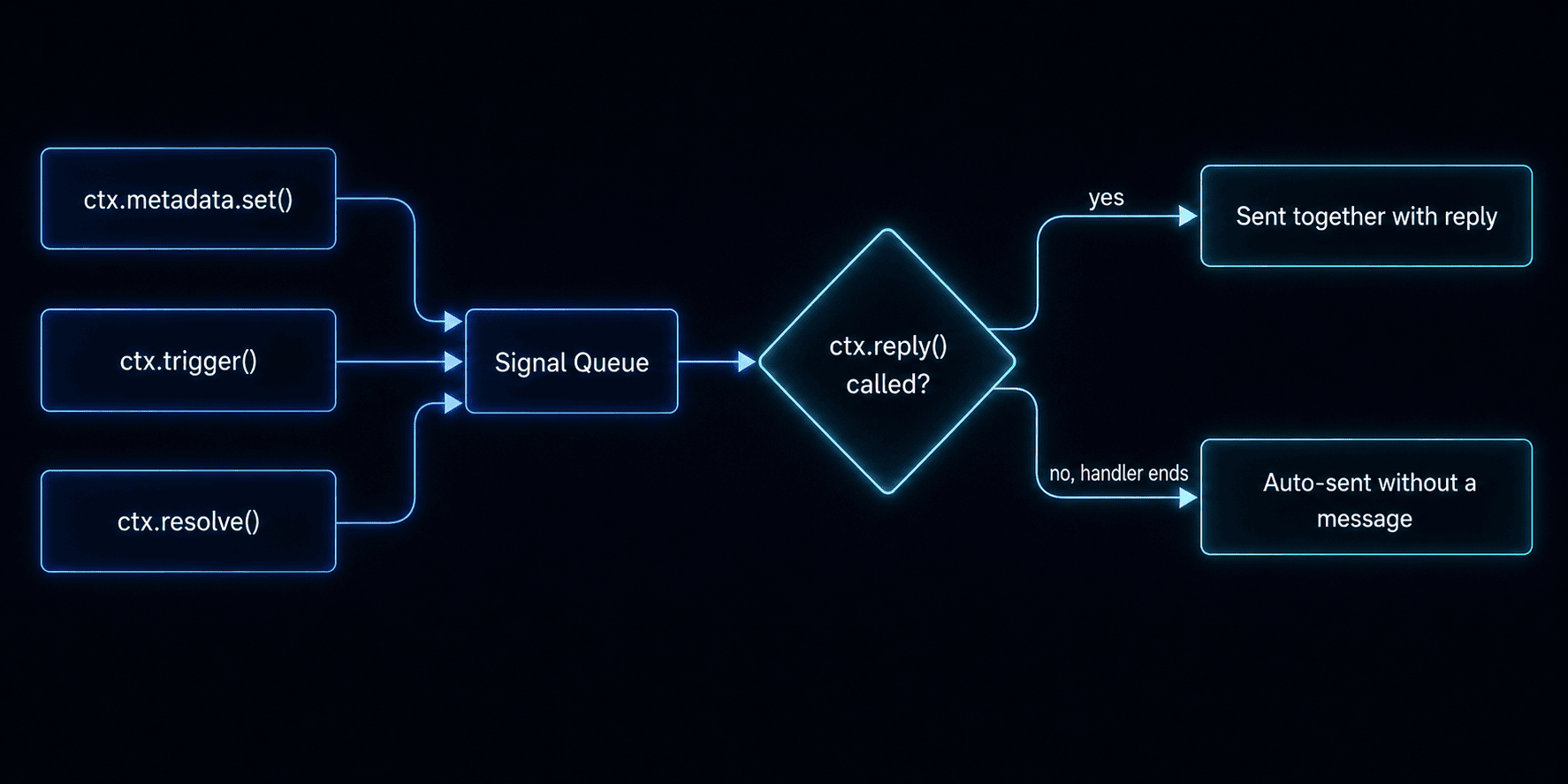 If your handler finishes without calling `ctx.reply()`, pending signals are still sent automatically.
## Set metadata
Store key-value data on the conversation (up to 64 KB cumulative). Metadata persists across messages and is available in `ctx.conversation.metadata` on every subsequent handler call.
```tsx theme={null}
ctx.metadata.set('sentiment', 'positive');
ctx.metadata.set('ticketId', 'JIRA-1234');
```
Use metadata for intent, ticket IDs, escalation flags, or any state your agent needs across turns.
## Trigger a workflow
Start any Novu workflow from a handler, the same workflows you use for email, push, or SMS elsewhere in your account.
```tsx theme={null}
ctx.trigger('escalation-email', {
to: ctx.subscriber?.subscriberId,
payload: { reason: 'User requested human support' },
});
```
Common patterns:
* Escalation emails
* CSAT surveys after resolution
* Alerting on-call teams
## Resolve a conversation
Mark the conversation as resolved with an optional summary. This sets status to `resolved`, fires `onResolve`, and stores the summary as signal activity.
```tsx theme={null}
ctx.resolve('Issue resolved - billing adjustment applied.');
```
Resolved conversations automatically reopen if the user sends a new message.
## Example: all three signals in one turn
```tsx theme={null}
import { agent } from '@novu/framework';
export const myAgent = agent('my-agent', {
onMessage: async (message, ctx) => {
const response = await callLLM(message.text ?? '', ctx.history);
ctx.metadata.set('lastIntent', response.intent);
if (response.needsEscalation) {
ctx.trigger('escalation-workflow', {
to: ctx.subscriber?.subscriberId,
payload: { reason: response.reason },
});
}
if (response.done) {
ctx.resolve(response.summary);
}
await ctx.reply(response.text);
},
});
```
## Related
Send plain text, markdown, attachments, and interactive cards.
Event handlers and the context object your agent receives on every turn.
Build end to end with `@novu/framework/ai-sdk`.
If your handler finishes without calling `ctx.reply()`, pending signals are still sent automatically.
## Set metadata
Store key-value data on the conversation (up to 64 KB cumulative). Metadata persists across messages and is available in `ctx.conversation.metadata` on every subsequent handler call.
```tsx theme={null}
ctx.metadata.set('sentiment', 'positive');
ctx.metadata.set('ticketId', 'JIRA-1234');
```
Use metadata for intent, ticket IDs, escalation flags, or any state your agent needs across turns.
## Trigger a workflow
Start any Novu workflow from a handler, the same workflows you use for email, push, or SMS elsewhere in your account.
```tsx theme={null}
ctx.trigger('escalation-email', {
to: ctx.subscriber?.subscriberId,
payload: { reason: 'User requested human support' },
});
```
Common patterns:
* Escalation emails
* CSAT surveys after resolution
* Alerting on-call teams
## Resolve a conversation
Mark the conversation as resolved with an optional summary. This sets status to `resolved`, fires `onResolve`, and stores the summary as signal activity.
```tsx theme={null}
ctx.resolve('Issue resolved - billing adjustment applied.');
```
Resolved conversations automatically reopen if the user sends a new message.
## Example: all three signals in one turn
```tsx theme={null}
import { agent } from '@novu/framework';
export const myAgent = agent('my-agent', {
onMessage: async (message, ctx) => {
const response = await callLLM(message.text ?? '', ctx.history);
ctx.metadata.set('lastIntent', response.intent);
if (response.needsEscalation) {
ctx.trigger('escalation-workflow', {
to: ctx.subscriber?.subscriberId,
payload: { reason: response.reason },
});
}
if (response.done) {
ctx.resolve(response.summary);
}
await ctx.reply(response.text);
},
});
```
## Related
Send plain text, markdown, attachments, and interactive cards.
Event handlers and the context object your agent receives on every turn.
Build end to end with `@novu/framework/ai-sdk`.