> ## Documentation Index
> Fetch the complete documentation index at: https://docs.novu.co/llms.txt
> Use this file to discover all available pages before exploring further.
# How do contexts work in Novu?
> Learn what contexts are in Novu, how they differ from payloads, and how they help you scope, personalize, and filter notifications across workflows and the Inbox.
A *context* is user-defined metadata you attach when triggering a workflow. Contexts let you scope, personalize, and filter notifications without duplicating subscribers, workflows, or templates.
Common context types include `tenant`, `app`, `region`, or any key that matches your product model. Each context entry is either a simple identifier or a rich object with an `id` and optional `data` fields.
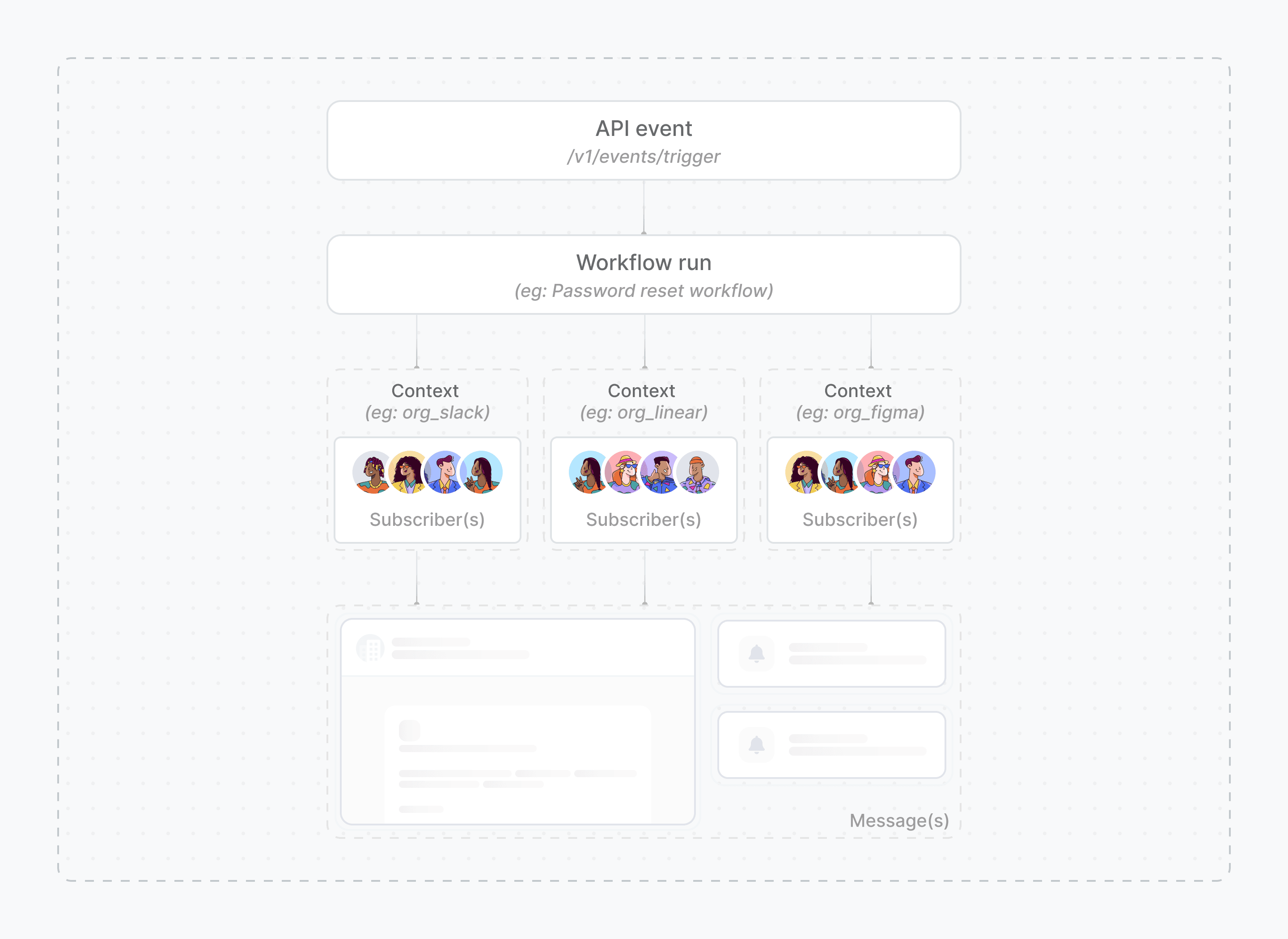 ## How contexts fit into Novu's model
When you [trigger](/platform/concepts/trigger) a workflow, you pass:
* A **subscriber** (who receives the notification)
* A **payload** (event-specific data for this run)
* An optional **context** (shared metadata that scopes and personalizes the notification)
Contexts are persistent. Unlike a payload, which exists only for a single workflow execution, context data is stored in Novu and reused across triggers, templates, the [Inbox](/platform/inbox), and the Activity Feed.
You can pass up to five context keys per trigger. Each context `data` object is limited to 64KB. See [Manage contexts](/platform/workflow/advanced-features/contexts/manage-contexts) for schema details.
## Context vs payload
| | Payload | Context |
| ------------------- | ---------------------------------- | --------------------------------- |
| **Scope** | Single workflow execution | Persistent across triggers |
| **Typical use** | Order ID, message text, action URL | Tenant name, app branding, region |
| **In templates** | `{{payload.field}}` | `{{context.tenant.data.name}}` |
| **Inbox filtering** | Not used for scoping | Exact-match filtering |
| **Auto-created** | No | Yes, on first reference |
Use the payload for data that changes on every event. Use context for metadata that defines *where* or *for whom* a notification belongs.
## Context structure
Each key in the `context` object is a context type. Novu supports three formats per key:
```ts theme={null}
context: {
// Simple string — type and id only
tenant: "acme-corp",
// Object with id
app: { id: "billing" },
// Object with id and metadata
region: {
id: "us-east",
data: {
name: "US East",
timezone: "America/New_York",
},
},
}
```
Contexts are **auto-created** the first time Novu sees them (via a trigger or the Inbox). Existing context data is **not** auto-updated, which prevents accidental overwrites. Update context data through the [Contexts API](/api-reference/contexts/context-schema) or the Novu dashboard.
## What you can use contexts for
Isolate notifications per organization, workspace, or customer using a `tenant` context—without prefixing subscriber IDs or duplicating workflows.
Route notifications to the right Inbox by scoping with an `app` or feature key when one subscriber uses multiple products.
Store logos, colors, and plan names in context `data` and reference them in templates with `{{context}}`.
Branch workflow steps based on context values, such as sending enterprise-only emails when `context.tenant.data.plan` is `enterprise`.
## How context scoping works
### In workflows and templates
Context data is available in every template editor through the `{{context}}` helper:
```liquid theme={null}
Welcome to {{context.tenant.data.name}}! Your {{context.tenant.data.plan}} plan is active.
```
You can also use context in [step conditions](/platform/workflow/add-and-configure-steps/step-conditions) to control which steps run.
### In the Inbox
The [Inbox](/platform/inbox) uses **exact-match** filtering. The `context` prop on `` must match the context used at trigger time, key for key and value for value. Notifications triggered with a tenant context only appear in an Inbox initialized with the same tenant context.
| Workflow context | Inbox context | Displayed? |
| -------------------- | ---------------------- | ---------- |
| `{ tenant: "acme" }` | `{ tenant: "acme" }` | Yes |
| `{ tenant: "acme" }` | `{ tenant: "globex" }` | No |
| `{ tenant: "acme" }` | `{}` | No |
When a subscriber switches tenants in your app, re-render the Inbox with the new context. Novu refetches notifications and reconnects the WebSocket scope automatically.
Because `context` is set on the client, secure it with `contextHash` in production. See [Inbox with context](/platform/inbox/configuration/inbox-with-context).
## Trigger a workflow with context
```ts theme={null}
import { Novu } from "@novu/api";
const novu = new Novu({ secretKey: "" });
await novu.trigger({
workflowId: "invoice-paid",
to: { subscriberId: "user-123" },
payload: { amount: "$250" },
context: {
tenant: {
id: "acme-corp",
data: { name: "Acme Corporation", plan: "enterprise" },
},
},
});
```
```python theme={null}
import os
import novu_py
from novu_py import Novu
with Novu(secret_key=os.getenv("NOVU_SECRET_KEY", "")) as novu:
novu.trigger(trigger_event_request_dto=novu_py.TriggerEventRequestDto(
workflow_id="invoice-paid",
to={"subscriber_id": "user-123"},
payload={"amount": "$250"},
context={
"tenant": {
"id": "acme-corp",
"data": {
"name": "Acme Corporation",
"plan": "enterprise",
},
},
},
))
```
```go theme={null}
import (
"context"
"os"
novugo "github.com/novuhq/novu-go"
"github.com/novuhq/novu-go/models/components"
)
s := novugo.New(novugo.WithSecurity(os.Getenv("NOVU_SECRET_KEY")))
s.Trigger(context.Background(), components.TriggerEventRequestDto{
WorkflowID: "invoice-paid",
To: components.CreateToSubscriberPayloadDto(components.SubscriberPayloadDto{
SubscriberID: "user-123",
}),
Payload: map[string]any{"amount": "$250"},
Context: map[string]any{
"tenant": map[string]any{
"id": "acme-corp",
"data": map[string]any{
"name": "Acme Corporation",
"plan": "enterprise",
},
},
},
}, nil)
```
```php theme={null}
use novu;
use novu\Models\Components;
$sdk = novu\Novu::builder()
->setSecurity('')
->build();
$sdk->trigger(
triggerEventRequestDto: new Components\TriggerEventRequestDto(
workflowId: 'invoice-paid',
to: new Components\SubscriberPayloadDto(subscriberId: 'user-123'),
payload: ['amount' => '$250'],
context: [
'tenant' => [
'id' => 'acme-corp',
'data' => [
'name' => 'Acme Corporation',
'plan' => 'enterprise',
],
],
],
),
);
```
```csharp theme={null}
using Novu;
using Novu.Models.Components;
using System.Collections.Generic;
var sdk = new NovuSDK(secretKey: "");
await sdk.TriggerAsync(triggerEventRequestDto: new TriggerEventRequestDto() {
WorkflowId = "invoice-paid",
To = To.CreateSubscriberPayloadDto(new SubscriberPayloadDto() {
SubscriberId = "user-123",
}),
Payload = new Dictionary() {
{ "amount", "$250" },
},
Context = new Dictionary() {
{ "tenant", new Dictionary() {
{ "id", "acme-corp" },
{ "data", new Dictionary() {
{ "name", "Acme Corporation" },
{ "plan", "enterprise" },
} },
} },
},
});
```
```java theme={null}
import co.novu.Novu;
import co.novu.models.components.*;
import java.util.Map;
Novu novu = Novu.builder()
.secretKey("")
.build();
novu.trigger()
.body(TriggerEventRequestDto.builder()
.workflowId("invoice-paid")
.to(To2.of(SubscriberPayloadDto.builder()
.subscriberId("user-123")
.build()))
.payload(Map.of("amount", "$250"))
.context(Map.ofEntries(
Map.entry("tenant", TriggerEventRequestDtoContextUnion.of(
TriggerEventRequestDtoContext2.builder()
.id("acme-corp")
.data(Map.ofEntries(
Map.entry("name", "Acme Corporation"),
Map.entry("plan", "enterprise")))
.build()))))
.build())
.call();
```
```bash theme={null}
curl -L -g -X POST 'https://api.novu.co/v1/events/trigger' \
-H 'Content-Type: application/json' \
-H 'Accept: application/json' \
-H 'Authorization: ApiKey ' \
-d '{
"name": "invoice-paid",
"to": { "subscriberId": "user-123" },
"payload": { "amount": "$250" },
"context": {
"tenant": {
"id": "acme-corp",
"data": {
"name": "Acme Corporation",
"plan": "enterprise"
}
}
}
}'
```
## Next steps
Implement tenant isolation with contexts end to end.
Create, update, and delete contexts through the API or dashboard.
Personalize templates and add conditional logic with context data.
Filter the Inbox by context and secure it with `contextHash`.
## How contexts fit into Novu's model
When you [trigger](/platform/concepts/trigger) a workflow, you pass:
* A **subscriber** (who receives the notification)
* A **payload** (event-specific data for this run)
* An optional **context** (shared metadata that scopes and personalizes the notification)
Contexts are persistent. Unlike a payload, which exists only for a single workflow execution, context data is stored in Novu and reused across triggers, templates, the [Inbox](/platform/inbox), and the Activity Feed.
You can pass up to five context keys per trigger. Each context `data` object is limited to 64KB. See [Manage contexts](/platform/workflow/advanced-features/contexts/manage-contexts) for schema details.
## Context vs payload
| | Payload | Context |
| ------------------- | ---------------------------------- | --------------------------------- |
| **Scope** | Single workflow execution | Persistent across triggers |
| **Typical use** | Order ID, message text, action URL | Tenant name, app branding, region |
| **In templates** | `{{payload.field}}` | `{{context.tenant.data.name}}` |
| **Inbox filtering** | Not used for scoping | Exact-match filtering |
| **Auto-created** | No | Yes, on first reference |
Use the payload for data that changes on every event. Use context for metadata that defines *where* or *for whom* a notification belongs.
## Context structure
Each key in the `context` object is a context type. Novu supports three formats per key:
```ts theme={null}
context: {
// Simple string — type and id only
tenant: "acme-corp",
// Object with id
app: { id: "billing" },
// Object with id and metadata
region: {
id: "us-east",
data: {
name: "US East",
timezone: "America/New_York",
},
},
}
```
Contexts are **auto-created** the first time Novu sees them (via a trigger or the Inbox). Existing context data is **not** auto-updated, which prevents accidental overwrites. Update context data through the [Contexts API](/api-reference/contexts/context-schema) or the Novu dashboard.
## What you can use contexts for
Isolate notifications per organization, workspace, or customer using a `tenant` context—without prefixing subscriber IDs or duplicating workflows.
Route notifications to the right Inbox by scoping with an `app` or feature key when one subscriber uses multiple products.
Store logos, colors, and plan names in context `data` and reference them in templates with `{{context}}`.
Branch workflow steps based on context values, such as sending enterprise-only emails when `context.tenant.data.plan` is `enterprise`.
## How context scoping works
### In workflows and templates
Context data is available in every template editor through the `{{context}}` helper:
```liquid theme={null}
Welcome to {{context.tenant.data.name}}! Your {{context.tenant.data.plan}} plan is active.
```
You can also use context in [step conditions](/platform/workflow/add-and-configure-steps/step-conditions) to control which steps run.
### In the Inbox
The [Inbox](/platform/inbox) uses **exact-match** filtering. The `context` prop on `` must match the context used at trigger time, key for key and value for value. Notifications triggered with a tenant context only appear in an Inbox initialized with the same tenant context.
| Workflow context | Inbox context | Displayed? |
| -------------------- | ---------------------- | ---------- |
| `{ tenant: "acme" }` | `{ tenant: "acme" }` | Yes |
| `{ tenant: "acme" }` | `{ tenant: "globex" }` | No |
| `{ tenant: "acme" }` | `{}` | No |
When a subscriber switches tenants in your app, re-render the Inbox with the new context. Novu refetches notifications and reconnects the WebSocket scope automatically.
Because `context` is set on the client, secure it with `contextHash` in production. See [Inbox with context](/platform/inbox/configuration/inbox-with-context).
## Trigger a workflow with context
```ts theme={null}
import { Novu } from "@novu/api";
const novu = new Novu({ secretKey: "" });
await novu.trigger({
workflowId: "invoice-paid",
to: { subscriberId: "user-123" },
payload: { amount: "$250" },
context: {
tenant: {
id: "acme-corp",
data: { name: "Acme Corporation", plan: "enterprise" },
},
},
});
```
```python theme={null}
import os
import novu_py
from novu_py import Novu
with Novu(secret_key=os.getenv("NOVU_SECRET_KEY", "")) as novu:
novu.trigger(trigger_event_request_dto=novu_py.TriggerEventRequestDto(
workflow_id="invoice-paid",
to={"subscriber_id": "user-123"},
payload={"amount": "$250"},
context={
"tenant": {
"id": "acme-corp",
"data": {
"name": "Acme Corporation",
"plan": "enterprise",
},
},
},
))
```
```go theme={null}
import (
"context"
"os"
novugo "github.com/novuhq/novu-go"
"github.com/novuhq/novu-go/models/components"
)
s := novugo.New(novugo.WithSecurity(os.Getenv("NOVU_SECRET_KEY")))
s.Trigger(context.Background(), components.TriggerEventRequestDto{
WorkflowID: "invoice-paid",
To: components.CreateToSubscriberPayloadDto(components.SubscriberPayloadDto{
SubscriberID: "user-123",
}),
Payload: map[string]any{"amount": "$250"},
Context: map[string]any{
"tenant": map[string]any{
"id": "acme-corp",
"data": map[string]any{
"name": "Acme Corporation",
"plan": "enterprise",
},
},
},
}, nil)
```
```php theme={null}
use novu;
use novu\Models\Components;
$sdk = novu\Novu::builder()
->setSecurity('')
->build();
$sdk->trigger(
triggerEventRequestDto: new Components\TriggerEventRequestDto(
workflowId: 'invoice-paid',
to: new Components\SubscriberPayloadDto(subscriberId: 'user-123'),
payload: ['amount' => '$250'],
context: [
'tenant' => [
'id' => 'acme-corp',
'data' => [
'name' => 'Acme Corporation',
'plan' => 'enterprise',
],
],
],
),
);
```
```csharp theme={null}
using Novu;
using Novu.Models.Components;
using System.Collections.Generic;
var sdk = new NovuSDK(secretKey: "");
await sdk.TriggerAsync(triggerEventRequestDto: new TriggerEventRequestDto() {
WorkflowId = "invoice-paid",
To = To.CreateSubscriberPayloadDto(new SubscriberPayloadDto() {
SubscriberId = "user-123",
}),
Payload = new Dictionary() {
{ "amount", "$250" },
},
Context = new Dictionary() {
{ "tenant", new Dictionary() {
{ "id", "acme-corp" },
{ "data", new Dictionary() {
{ "name", "Acme Corporation" },
{ "plan", "enterprise" },
} },
} },
},
});
```
```java theme={null}
import co.novu.Novu;
import co.novu.models.components.*;
import java.util.Map;
Novu novu = Novu.builder()
.secretKey("")
.build();
novu.trigger()
.body(TriggerEventRequestDto.builder()
.workflowId("invoice-paid")
.to(To2.of(SubscriberPayloadDto.builder()
.subscriberId("user-123")
.build()))
.payload(Map.of("amount", "$250"))
.context(Map.ofEntries(
Map.entry("tenant", TriggerEventRequestDtoContextUnion.of(
TriggerEventRequestDtoContext2.builder()
.id("acme-corp")
.data(Map.ofEntries(
Map.entry("name", "Acme Corporation"),
Map.entry("plan", "enterprise")))
.build()))))
.build())
.call();
```
```bash theme={null}
curl -L -g -X POST 'https://api.novu.co/v1/events/trigger' \
-H 'Content-Type: application/json' \
-H 'Accept: application/json' \
-H 'Authorization: ApiKey ' \
-d '{
"name": "invoice-paid",
"to": { "subscriberId": "user-123" },
"payload": { "amount": "$250" },
"context": {
"tenant": {
"id": "acme-corp",
"data": {
"name": "Acme Corporation",
"plan": "enterprise"
}
}
}
}'
```
## Next steps
Implement tenant isolation with contexts end to end.
Create, update, and delete contexts through the API or dashboard.
Personalize templates and add conditional logic with context data.
Filter the Inbox by context and secure it with `contextHash`.