# Introduction to Inbox (/platform/inbox)
Learn how to integrate Novu Inbox component, a pre-built notification center component for real-time in-app notifications in your application.
import { Card, Cards } from 'fumadocs-ui/components/card';
import { Tab, Tabs } from 'fumadocs-ui/components/tabs';
import { Bell, Code, Layout, Sliders } from 'lucide-react';
The Novu Inbox is a prebuilt, ready-to-use, and fully customizable UI component for delivering real-time in-app notifications. It gives your subscribers a centralized place to view and manage notifications.
With just a few lines of code, you can embed a polished, real-time notification experience directly into your application.

## Composable architecture
The Novu Inbox is built with a composable architecture. It is composed of other sub-components:
} href="/platform/inbox/advanced-customization/customize-bell#bell-component">
Used to display the bell icon and trigger the notification component when clicked
} href="/platform/inbox/advanced-customization/customize-popover#notifications-component">
Displays the notifications list
} href="/platform/inbox/advanced-customization/customize-popover#inboxcontent-component">
Displays the content of the `` menu
} href="/platform/inbox/configuration/preferences#using-the-preferences--component">
Used to display the preferences modal
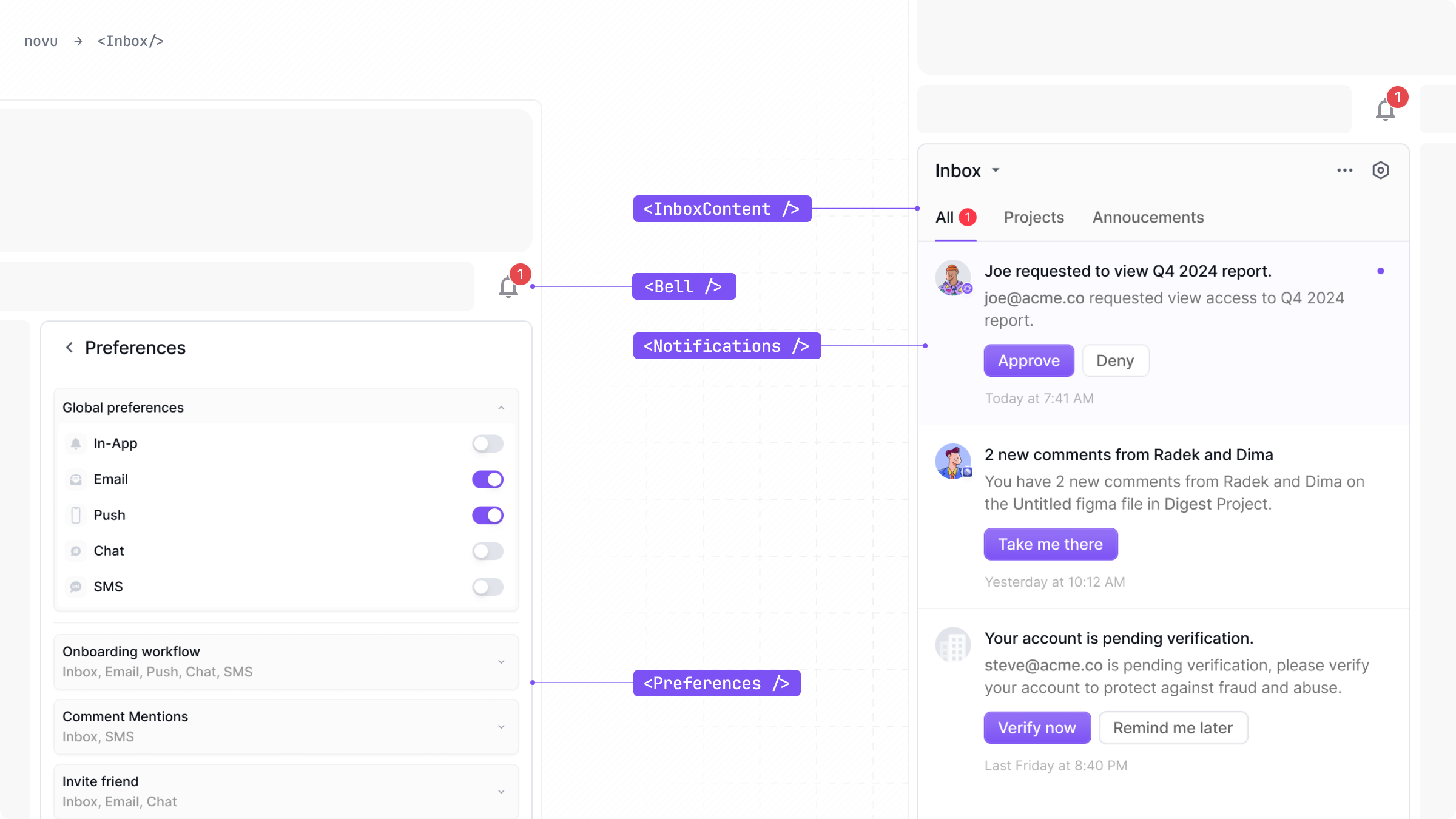
By composing these individual components, you can create multiple popular inbox layouts that fit perfectly within your application's design.
To aid your design process, we provide a [free Figma file](https://www.figma.com/community/file/1425407348374863860) that contains all of the design assets. Make a copy of the file into your own account to get started with customizing your graphical Inbox elements.
## Key feature
* Full stack integration: The Inbox handles UI, unread states, routing, and preferences all in one place.
* Highly customizable: Override styles, replace every UI elements and icons.
* Flexible layouts: Use the default Inbox UI layout or build your own.
* Built-in support for Tabs and filters, localization, snoozing, preferences management, and more.
## How it works
At a high level, the Inbox abstracts away the complexity of building a notification center.
1. When you drop the Inbox component into your application, it securely connects to Novu's services.
2. It automatically fetches user notifications and manages the real-time unread count displayed on the bell icon.
3. When a user clicks the bell, it presents the list of notifications and user preferences.
4. All user interactions, such as marking a notification as read or changing a preference, are automatically synchronized with the Novu backend in real-time.
## Ways to implement the Novu Inbox
There are two integration approaches, depending on your needs for speed versus customization.
### The "Plug-and-Play" approach
This is the fastest way to integrate the Novu Inbox. The Inbox component, encapsulate all the UI and logic. You simply drop the component into your application, configure it with the necessary properties, and you're done.
### "Build-Your-Own" Approach
For maximum flexibility and complete control over the look and feel, use the [@novu/react SDK](/platform/sdks/react) for react hooks or [@novu/js SDK](/platform/sdks/javascript) for framework agnostic javascript methods.
You get the power of Novu's notification engine while building a user interface that perfectly matches your application's design system.