# Styling the Inbox component (/platform/inbox/configuration/styling)
Learn how to style the pre built Inbox component
import { TypeTable } from 'fumadocs-ui/components/type-table';
import { Tab, Tabs } from 'fumadocs-ui/components/tabs';
import { Accordion, Accordions } from 'fumadocs-ui/components/accordion';
The Novu Inbox component is designed to be fully themeable and adaptable to your application’s visual language. All theming options are exposed through the `appearance` prop, which allows you to apply custom styles at different levels of control from predefined themes to component-level overrides.
The appearance prop supports the following keys:
* `baseTheme`: Apply a predefined theme (for example, light or dark).
* `variables`: Define global styling properties (for example, colors, fonts).
* `elements`: Style individual UI components.
* `icons`: Replace default icons with custom ones.
Check out the [Inbox Playground](https://inbox.novu.co) to see how the Inbox looks with common design presets. It showcases pre-styled variants like Notion and Reddit. helpful for seeing what’s possible before you start customizing.
### Understand style injection
When rendered, the Inbox component automatically injects its styles into the `` of the HTML document. If the component is rendered inside a shadow DOM, styles are scoped and injected into the shadow root instead.
This ensures that:
* Styles remain encapsulated and do not leak into global stylesheets
* No additional setup is required to manage scoped styling
## Apply base theme
You can apply a predefined visual style to the entire Inbox UI by passing the `baseTheme` object inside the `appearance` prop. This is a quick way to implement a dark mode or any base look and feel without redefining every variable.
### Dark mode
Novu currently provides a built-in dark theme, which you can import from `@novu/react/themes`.
```tsx
import { Inbox } from '@novu/react';
import { dark } from '@novu/react/themes';
function Novu() {
return (
);
}
export default Novu;
```
## Define global variables
You can override the default styles in the Inbox component by passing a `variables` object inside the `appearance` prop. This is an efficient way to apply broad visual changes with minimal configuration.

```tsx
import { Inbox } from '@novu/react';
const appearance = {
variables: {
colorBackground: '#f0f0f0',
borderRadius: '8px',
},
};
function Novu() {
return (
);
}
export default Novu;
```
When both `baseTheme` and `variables` are provided, variables always take precedence over the base theme.
### List of available variables
## Style the Inbox UI elements
You can define styles for individual UI components within the Inbox UI by passing the `elements` object inside the appearance prop. Each key corresponds to a specific component, and the value can be either a style object or a set of CSS classes.
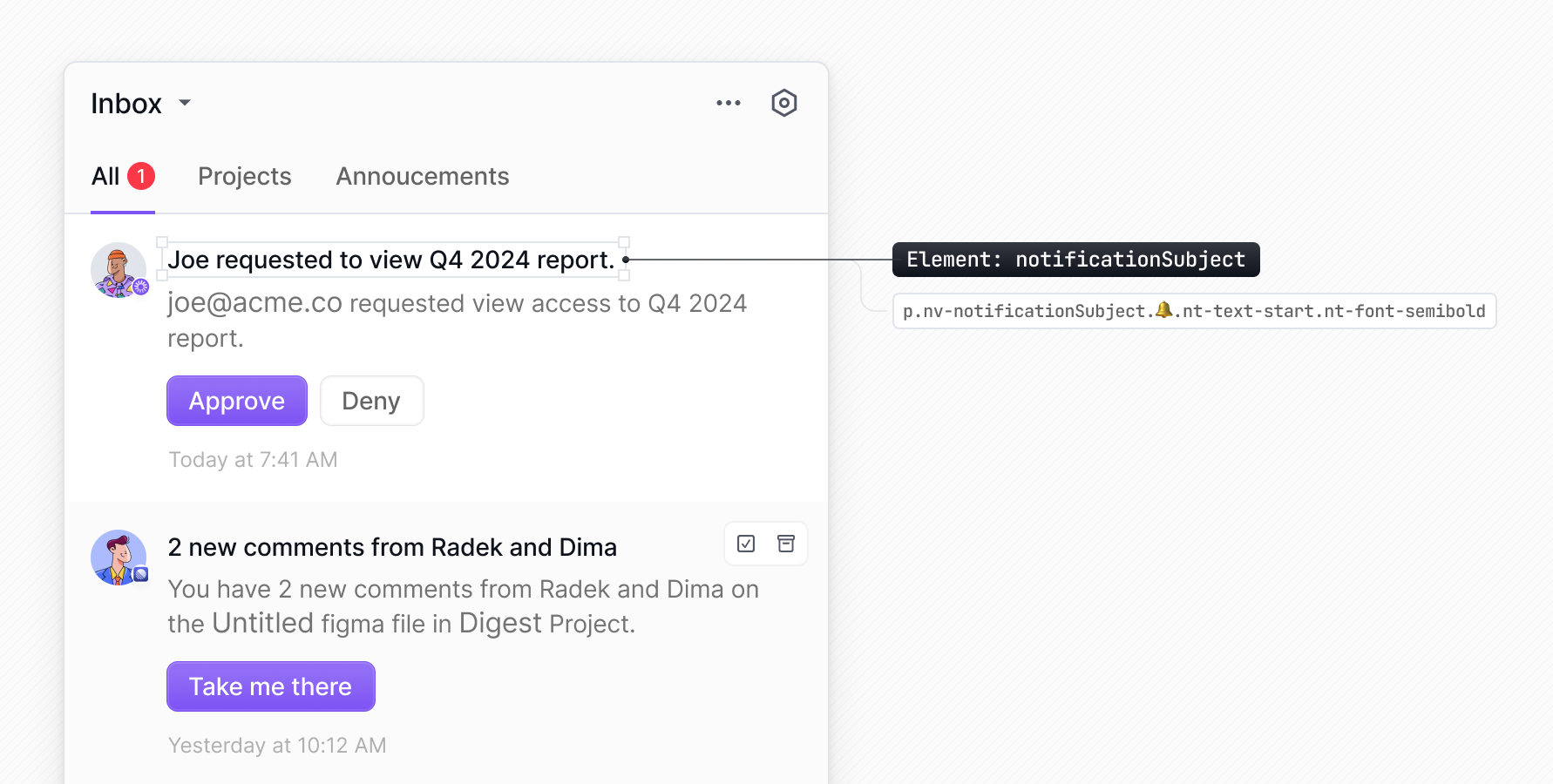
Here's a list of some available elements that can be styled using the elements object in your appearance configuration:
| Element | Key in `appearance.elements` |
| ---------------------------- | ------------------------------------- |
| Primary action button | `notificationPrimaryAction__button` |
| Secondary action button | `notificationSecondaryAction__button` |
| Notification container | `notification` |
| Subject text | `notificationSubject` |
| Body text | `notificationBody` |
| Notification icon/image | `notificationImage` |
| Preferences button | `preferences__button` |
| Date display | `notificationDate` |
| Archive button | `notificationArchive__button` |
| Snooze button | `notificationSnooze__button` |
| Unread/read indicator button | `notificationUnread__button` |
| Notification list container | `notificationList` |
| Schedule container | `scheduleContainer` |
| Schedule header | `scheduleHeader` |
| Schedule body | `scheduleBody` |
| Schedule table | `scheduleTable` |
| Day schedule copy title | `dayScheduleCopyTitle` |
| Day schedule copy menu | `dayScheduleCopy__dropdownContent` |
| Time select drop-down list | `timeSelect__dropdownTrigger` |
| Time select list | `timeSelect__dropdownContent` |
Any selector that appears before the 🔔 emoji in the Devtools, can be targeted via the elements property in the appearance prop (stripping the `nv-` prefix). You can also use TS autocomplete to find the available elements.
### Using style object
You can pass inline styles to individual elements using the `elements` object in the `appearance` prop. Each element accepts a style object.
```tsx
import { Inbox } from '@novu/react';
const appearance = {
elements: {
notificationSubject: {
color: '#ff0000',
},
},
};
function Novu() {
return (
);
}
export default Novu;
```
### Using Tailwind CSS
You can pass [Tailwind CSS](https://tailwindcss.com/docs/installation/tailwind-cli) classes to specific elements using the elements object within the appearance prop.
```tsx
import { Inbox } from '@novu/react';
const appearance = {
elements: {
bellIcon: 'p-4 bg-white rounded-full',
notification: 'bg-white rounded-lg shadow-sm hover:shadow-md hover:bg-gray-50',
},
};
function Novu() {
return (
);
}
export default Novu;
```
### Using CSS modules
You can style the Inbox components using [CSS Modules](https://github.com/css-modules/css-modules). First, define the styles in a `.module.css` file:
```css title="styles.module.css"
.bellIcon {
padding: 1rem;
background-color: white;
border-radius: 50%;
}
.bellIcon:hover {
background-color: #f9fafb;
}
.notification {
background-color: white;
border-radius: 0.5rem;
box-shadow: 0 1px 2px 0 rgba(0, 0, 0, 0.05);
}
.notification:hover {
background-color: #f9fafb;
}
```
Then, import the CSS module into your component and apply the classes using the `elements` object in the `appearance` prop:
```tsx
import { Inbox } from '@novu/react';
import styles from './styles.module.css';
const appearance = {
elements: {
bellIcon: styles.bellIcon,
notification: styles.notification,
},
};
function Novu() {
return (
);
}
export default Novu;
```
## Apply styles dynamically using contextual callbacks
You can customize specific parts of the Inbox UI by providing callback functions for certain keys. This function receives contextual information such as unread counts, notification data, or preference details and let you apply styles dynamically based on runtime values from your application.
| Key | Context signature |
| --------------------------------------------- | ----------------------------------------------------------------------------------------------------------------- |
| **Bell** | |
| `bellDot` | `(context: { unreadCount: { total: number; severity: Record } }) => string` |
| `bellIcon` | `(context: { unreadCount: { total: number; severity: Record } }) => string` |
| `bellContainer` | `(context: { unreadCount: { total: number; severity: Record } }) => string` |
| `severityHigh__bellContainer` | `(context: { unreadCount: { total: number; severity: Record } }) => string` |
| `severityMedium__bellContainer` | `(context: { unreadCount: { total: number; severity: Record } }) => string` |
| `severityLow__bellContainer` | `(context: { unreadCount: { total: number; severity: Record } }) => string` |
| `bellSeverityGlow` | `(context: { unreadCount: { total: number; severity: Record } }) => string` |
| `severityGlowHigh__bellSeverityGlow` | `(context: { unreadCount: { total: number; severity: Record } }) => string` |
| `severityGlowMedium__bellSeverityGlow` | `(context: { unreadCount: { total: number; severity: Record } }) => string` |
| `severityGlowLow__bellSeverityGlow` | `(context: { unreadCount: { total: number; severity: Record } }) => string` |
| **Preferences list (shared)** | |
| `preferencesContainer` | `(context: { preferences?: Preference[]; groups: Array<{ name: string; preferences: Preference[] }> }) => string` |
| **Preference** | |
| `workflowContainer` | `(context: { preference: Preference }) => string` |
| `workflowLabelContainer` | `(context: { preference: Preference }) => string` |
| `workflowLabelHeader` | `(context: { preference: Preference }) => string` |
| `workflowLabelHeaderContainer` | `(context: { preference: Preference }) => string` |
| `workflowLabelIcon` | `(context: { preference: Preference }) => string` |
| `workflowLabel` | `(context: { preference: Preference }) => string` |
| `workflowArrow__icon` | `(context: { preference: Preference }) => string` |
| `workflowContainerRight__icon` | `(context: { preference: Preference }) => string` |
| **Channel** | |
| `channelsContainer` | `(context: { preference: Preference }) => string` |
| `channelName` | `(context: { preference: Preference }) => string` |
| **Channel Row (shared)** | |
| `channelContainer` | `(context: { preference?: Preference; preferenceGroup?: { name: string; preferences: Preference[] } }) => string` |
| `channelLabelContainer` | `(context: { preference?: Preference; preferenceGroup?: { name: string; preferences: Preference[] } }) => string` |
| `channelIconContainer` | `(context: { preference?: Preference; preferenceGroup?: { name: string; preferences: Preference[] } }) => string` |
| `channelLabel` | `(context: { preference?: Preference; preferenceGroup?: { name: string; preferences: Preference[] } }) => string` |
| `channelSwitchContainer` | `(context: { preference?: Preference; preferenceGroup?: { name: string; preferences: Preference[] } }) => string` |
| `channel__icon` | `(context: { preference?: Preference; preferenceGroup?: { name: string; preferences: Preference[] } }) => string` |
| **Preferences Group** | |
| `preferencesGroupContainer` | `(context: { preferenceGroup: { name: string; preferences: Preference[] } }) => string` |
| `preferencesGroupHeader` | `(context: { preferenceGroup: { name: string; preferences: Preference[] } }) => string` |
| `preferencesGroupLabelContainer` | `(context: { preferenceGroup: { name: string; preferences: Preference[] } }) => string` |
| `preferencesGroupLabelIcon` | `(context: { preferenceGroup: { name: string; preferences: Preference[] } }) => string` |
| `preferencesGroupLabel` | `(context: { preferenceGroup: { name: string; preferences: Preference[] } }) => string` |
| `preferencesGroupActionsContainer` | `(context: { preferenceGroup: { name: string; preferences: Preference[] } }) => string` |
| `preferencesGroupActionsContainerRight__icon` | `(context: { preferenceGroup: { name: string; preferences: Preference[] } }) => string` |
| `preferencesGroupBody` | `(context: { preferenceGroup: { name: string; preferences: Preference[] } }) => string` |
| `preferencesGroupChannels` | `(context: { preferenceGroup: { name: string; preferences: Preference[] } }) => string` |
| `preferencesGroupInfo` | `(context: { preferenceGroup: { name: string; preferences: Preference[] } }) => string` |
| `preferencesGroupInfoIcon` | `(context: { preferenceGroup: { name: string; preferences: Preference[] } }) => string` |
| `preferencesGroupWorkflows` | `(context: { preferenceGroup: { name: string; preferences: Preference[] } }) => string` |
| **Notification list** | |
| `notificationList` | `(context: { notifications: Notification[] }) => string` |
| `notificationListContainer` | `(context: { notifications: Notification[] }) => string` |
| **Notification** | |
| `notification` | `(context: { notification: Notification }) => string` |
| `severityHigh__notification` | `(context: { notification: Notification }) => string` |
| `severityMedium__notification` | `(context: { notification: Notification }) => string` |
| `severityLow__notification` | `(context: { notification: Notification }) => string` |
| `notificationBar` | `(context: { notification: Notification }) => string` |
| `severityHigh__notificationBar` | `(context: { notification: Notification }) => string` |
| `severityMedium__notificationBar` | `(context: { notification: Notification }) => string` |
| `severityLow__notificationBar` | `(context: { notification: Notification }) => string` |
| `notificationImageLoadingFallback` | `(context: { notification: Notification }) => string` |
| `notificationImage` | `(context: { notification: Notification }) => string` |
| `notificationContent` | `(context: { notification: Notification }) => string` |
| `notificationTextContainer` | `(context: { notification: Notification }) => string` |
| `notificationSubject` | `(context: { notification: Notification }) => string` |
| `notificationBody` | `(context: { notification: Notification }) => string` |
| `notificationDefaultActions` | `(context: { notification: Notification }) => string` |
| `notificationCustomActions` | `(context: { notification: Notification }) => string` |
| `notificationPrimaryAction__button` | `(context: { notification: Notification }) => string` |
| `notificationSecondaryAction__button` | `(context: { notification: Notification }) => string` |
| `notificationDate` | `(context: { notification: Notification }) => string` |
| `notificationDeliveredAt__badge` | `(context: { notification: Notification }) => string` |
| `notificationDeliveredAt__icon` | `(context: { notification: Notification }) => string` |
| `notificationSnoozedUntil__icon` | `(context: { notification: Notification }) => string` |
| `notificationDot` | `(context: { notification: Notification }) => string` |
| **Schedule** | |
| `scheduleContainer` | `(context: { schedule?: Schedule }) => string` |
| `scheduleHeader` | `(context: { schedule?: Schedule }) => string` |
| `scheduleLabelContainer` | `(context: { schedule?: Schedule }) => string` |
| `scheduleLabelIcon` | `(context: { schedule?: Schedule }) => string` |
| `scheduleLabel` | `(context: { schedule?: Schedule }) => string` |
| `scheduleActionsContainer` | `(context: { schedule?: Schedule }) => string` |
| `scheduleActionsContainerRight` | `(context: { schedule?: Schedule }) => string` |
| `scheduleBody` | `(context: { schedule?: Schedule }) => string` |
| `scheduleDescription` | `(context: { schedule?: Schedule }) => string` |
| `scheduleTable` | `(context: { schedule?: Schedule }) => string` |
| `scheduleTableHeader` | `(context: { schedule?: Schedule }) => string` |
| `scheduleHeaderColumn` | `(context: { schedule?: Schedule }) => string` |
| `scheduleTableBody` | `(context: { schedule?: Schedule }) => string` |
| `scheduleBodyRow` | `(context: { schedule?: Schedule }) => string` |
| `scheduleBodyColumn` | `(context: { schedule?: Schedule }) => string` |
| `scheduleInfoContainer` | `(context: { schedule?: Schedule }) => string` |
| `scheduleInfoIcon` | `(context: { schedule?: Schedule }) => string` |
| `scheduleInfo` | `(context: { schedule?: Schedule }) => string` |
| **Day Schedule Copy** | |
| `dayScheduleCopyTitle` | `(context: { schedule?: Schedule }) => string` |
| `dayScheduleCopyIcon` | `(context: { schedule?: Schedule }) => string` |
| `dayScheduleCopySelectAll` | `(context: { schedule?: Schedule }) => string` |
| `dayScheduleCopyDay` | `(context: { schedule?: Schedule }) => string` |
| `dayScheduleCopyFooterContainer` | `(context: { schedule?: Schedule }) => string` |
Here are some examples:
### Style the bell icon based on unread count
You can change the bell icon color gradient based on the total number of unread notifications. The callback receives an `unreadCount` object, which is then used in the conditional logic.
```tsx
import { Inbox } from '@novu/react';
export default function Novu() {
const appearance = {
elements: {
bellIcon: ({ unreadCount }) => {
if (unreadCount.total > 1) {
return '[--bell-gradient-start:var(--color-red-500)] [--bell-gradient-end:var(--color-red-500)]';
}
return unreadCount.total > 10
? '[--bell-gradient-start:var(--color-yellow-500)] [--bell-gradient-end:var(--color-yellow-500)]'
: '[--bell-gradient-start:var(--color-gray-500)] [--bell-gradient-end:var(--color-gray-500)]';
},
},
};
return (
);
}
```
### Style notifications based on payload data
You can style individual notifications based on custom data in their payload. In the example below, the notification's background color is changed if a specific field (foo) exists in the notification's data object.
```tsx
import { Inbox } from '@novu/react';
export default function Novu() {
const appearance = {
elements: {
notification: ({ notification }) => {
if (notification.data?.foo) {
return 'bg-green-200';
}
return '';
},
},
};
return (
);
}
```
## Style notifications by severity
Notification severity comes with default visual styles, but you can fully customize how notifications look for each severity level using the `appearance` prop.

By default, the bell icon takes the color of the highest severity unread notification.
Each severity level exposes selectors you can target through the `variables` and `elements` objects to apply custom styling.
### Customizing severity colors
You can override the default severity colors by setting new CSS custom properties in the `appearance.variables` object. Updating these variables automatically changes both the notification color and the bell icon color.
| Prop | Description |
| --------------------- | ------------------------- |
| `colorSeverityHigh` | Color for high severity |
| `colorSeverityMedium` | Color for medium severity |
| `colorSeverityLow` | Color for low severity |
```tsx
const appearance = {
variables: {
colorSeverityHigh: 'green',
colorSeverityMedium: 'blue',
colorSeverityLow: 'yellow',
}
};
```
### Customizing severity elements
You can apply specific styles to individual components using keys in the `appearance.elements` object. This lets you target components conditionally based on their severity state.
```tsx
const appearance = {
elements: {
severityHigh__notificationBar: {
backgroundColor: 'red',
},
},
};
```
This table lists severity element keys:
| Elements key | Description |
| -------------------------------------- | -------------------------------------------------------------------------- |
| `severityHigh__bellContainer` | Styles the bell container for high severity |
| `severityMedium__bellContainer` | Styles the bell container for medium severity |
| `severityLow__bellContainer` | Styles the bell container for low severity |
| `bellSeverityGlow` | Base style for the severity glow around the bell |
| `severityGlowHigh__bellSeverityGlow` | Glow style for high severity |
| `severityGlowMedium__bellSeverityGlow` | Glow style for medium severity |
| `severityGlowLow__bellSeverityGlow` | Glow style for low severity |
| `severityHigh__notification` | Styles individual high severity notifications |
| `severityMedium__notification` | Styles individual medium severity notifications |
| `severityLow__notification` | Styles individual low severity notifications |
| `notificationBar` | Base style for the vertical notification bar on the left of a notification |
| `severityHigh__notificationBar` | Styles the notification bar for high severity |
| `severityMedium__notificationBar` | Styles the notification bar for medium severity |
| `severityLow__notificationBar` | Styles the notification bar for low severity |
## Responsive Inbox using CSS media queries
In mobile and smaller device, use `popoverContent` element and apply custom CSS class on it. Specify CSS media queries on this class and add this class in global CSS file so that it takes effect. In below example, we have applied media queries on the `novu-popover-content` class and added it in global CSS file.
```tsx title="ResponsiveInbox.tsx"
import { Inbox } from '@novu/react';
const ResponsiveInbox = () => {
return (
);
};
export default ResponsiveInbox;
```
```css title="global.css"
.novu-popover-content {
max-width: 500px;
}
@media (max-width: 768px) {
.novu-popover-content {
max-width: 350px;
}
}
@media (max-width: 480px) {
.novu-popover-content {
max-width: 250px;
}
}
@media (max-width: 320px) {
.novu-popover-content {
max-width: 200px;
}
}
```