> ## Documentation Index
> Fetch the complete documentation index at: https://docs.novu.co/llms.txt
> Use this file to discover all available pages before exploring further.
# Webex Messaging Chat Integration with Novu
> Connect Webex to Novu through OAuth and send workflow chat notifications to Webex rooms, threads, or people.
The Webex Messaging integration lets your application send Novu workflow notifications to Webex rooms and direct conversations. Your users authorize a Webex integration through OAuth, and Novu stores the resulting connection securely, refreshes its access token when needed, and routes each message to the room or person endpoint you register.
Deliver plain text or Markdown notifications to a room or an existing message thread.
Link a subscriber through OAuth or identify the recipient by Webex person ID or email.
## Prerequisites
* A [Webex developer account](https://developer.webex.com/).
* Permission to create a Webex integration.
* A Novu environment and secret key.
* A Webex room ID for room notifications, or a Webex person ID or email for direct notifications.
## Configure a Webex integration
Webex integrations use OAuth 2.0 to act on behalf of an authorized Webex user. The user who authorizes the connection must be able to access the rooms and people you want to target.
### Create the integration in Webex
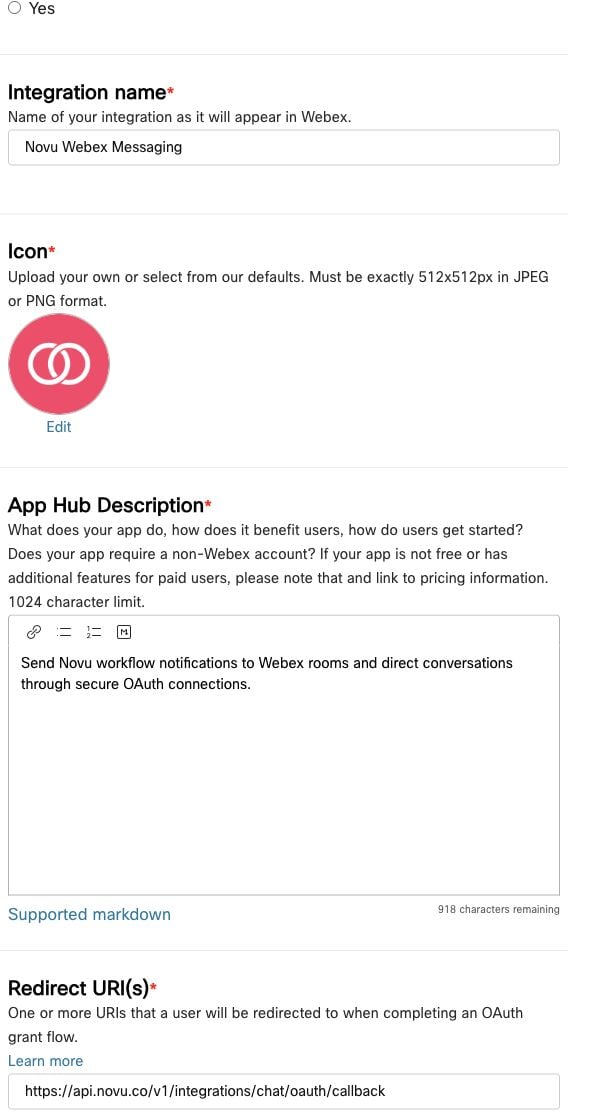
Sign in to the [Webex for Developers portal](https://developer.webex.com/my-apps) and open **My Webex Apps**.
Select **Create a New App**, then choose **Create an Integration**.
Add a user-facing name, icon, and description. Webex displays this information on the authorization screen.
Register the callback URI for the region where your Novu environment is hosted.
```text title="US region" theme={null}
https://api.novu.co/v1/integrations/chat/oauth/callback
```
```text title="EU region" theme={null}
https://eu.api.novu.co/v1/integrations/chat/oauth/callback
```
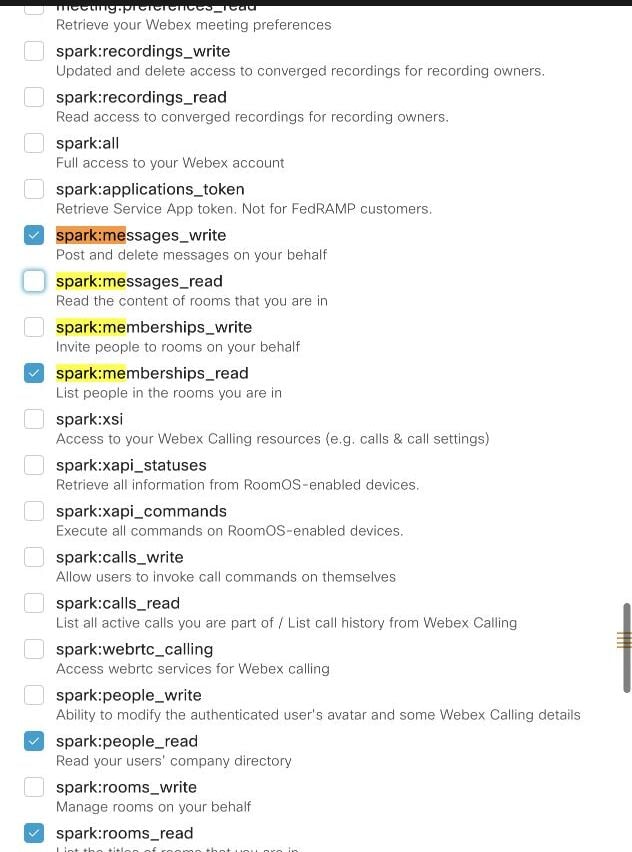
 Select the following scopes:
* `spark:messages_write`
* `spark:rooms_read`
* `spark:people_read`
* `spark:memberships_read`
Webex adds `spark:kms` to registered integrations. Novu includes it when generating the authorization URL because Webex requires it for encrypted message content.
Select the following scopes:
* `spark:messages_write`
* `spark:rooms_read`
* `spark:people_read`
* `spark:memberships_read`
Webex adds `spark:kms` to registered integrations. Novu includes it when generating the authorization URL because Webex requires it for encrypted message content.
 Save the integration, then copy its **Client ID** and **Client Secret**.
Webex shows the Client Secret only once. Store it securely before leaving the integration page.
Novu requests these scopes by default:
| Scope | How Novu uses it |
| ------------------------ | ------------------------------------------------------------------------------------------------------- |
| `spark:messages_write` | Send room and direct messages. |
| `spark:rooms_read` | Allow your application to discover rooms before registering a room endpoint. |
| `spark:people_read` | Resolve the authorized Webex person and support direct-message linking. |
| `spark:memberships_read` | Allow your application to inspect room membership when choosing destinations. |
| `spark:kms` | Access encrypted Webex content. Webex requires this scope for integrations that interact with messages. |
For more information, see [Webex Integrations and Authorization](https://developer.webex.com/create/docs/integrations).
## Configure Webex Messaging in Novu
Sign in to the [Novu Dashboard](https://dashboard.novu.co).
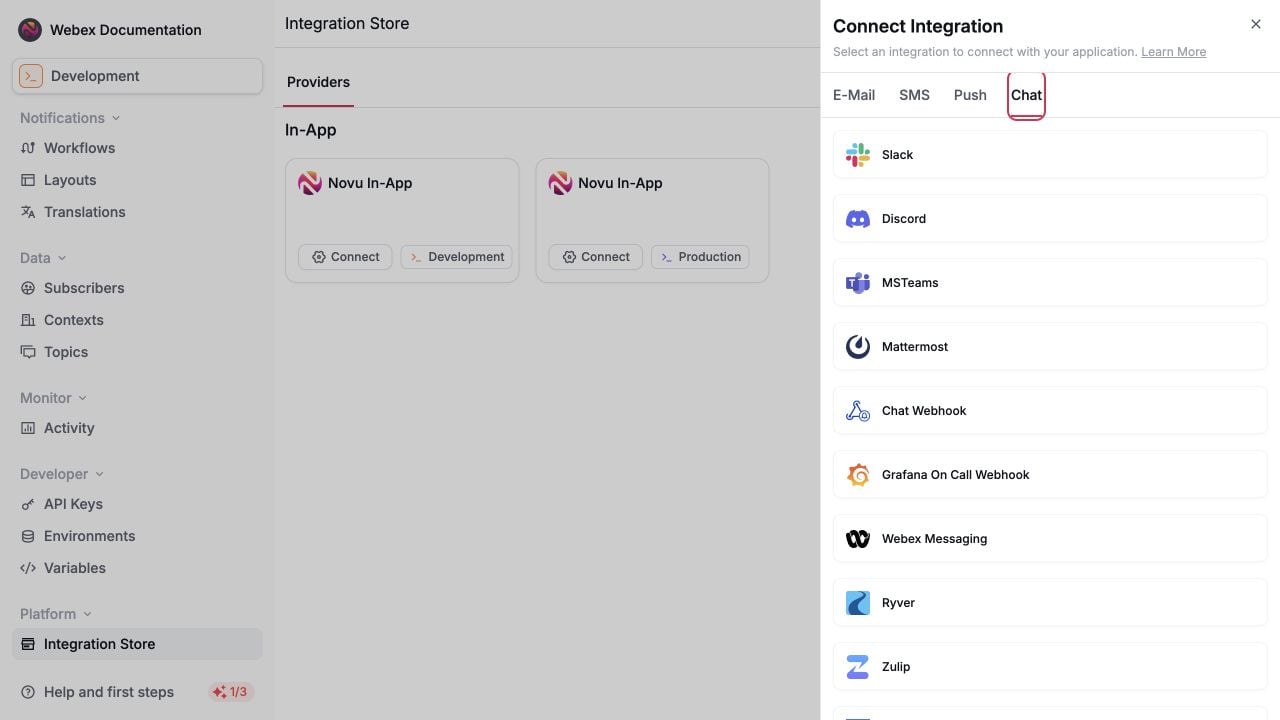
In the sidebar, select **Integrations Store**, then click **Connect provider**.
Choose **Webex Messaging** from the Chat providers.
Save the integration, then copy its **Client ID** and **Client Secret**.
Webex shows the Client Secret only once. Store it securely before leaving the integration page.
Novu requests these scopes by default:
| Scope | How Novu uses it |
| ------------------------ | ------------------------------------------------------------------------------------------------------- |
| `spark:messages_write` | Send room and direct messages. |
| `spark:rooms_read` | Allow your application to discover rooms before registering a room endpoint. |
| `spark:people_read` | Resolve the authorized Webex person and support direct-message linking. |
| `spark:memberships_read` | Allow your application to inspect room membership when choosing destinations. |
| `spark:kms` | Access encrypted Webex content. Webex requires this scope for integrations that interact with messages. |
For more information, see [Webex Integrations and Authorization](https://developer.webex.com/create/docs/integrations).
## Configure Webex Messaging in Novu
Sign in to the [Novu Dashboard](https://dashboard.novu.co).
In the sidebar, select **Integrations Store**, then click **Connect provider**.
Choose **Webex Messaging** from the Chat providers.
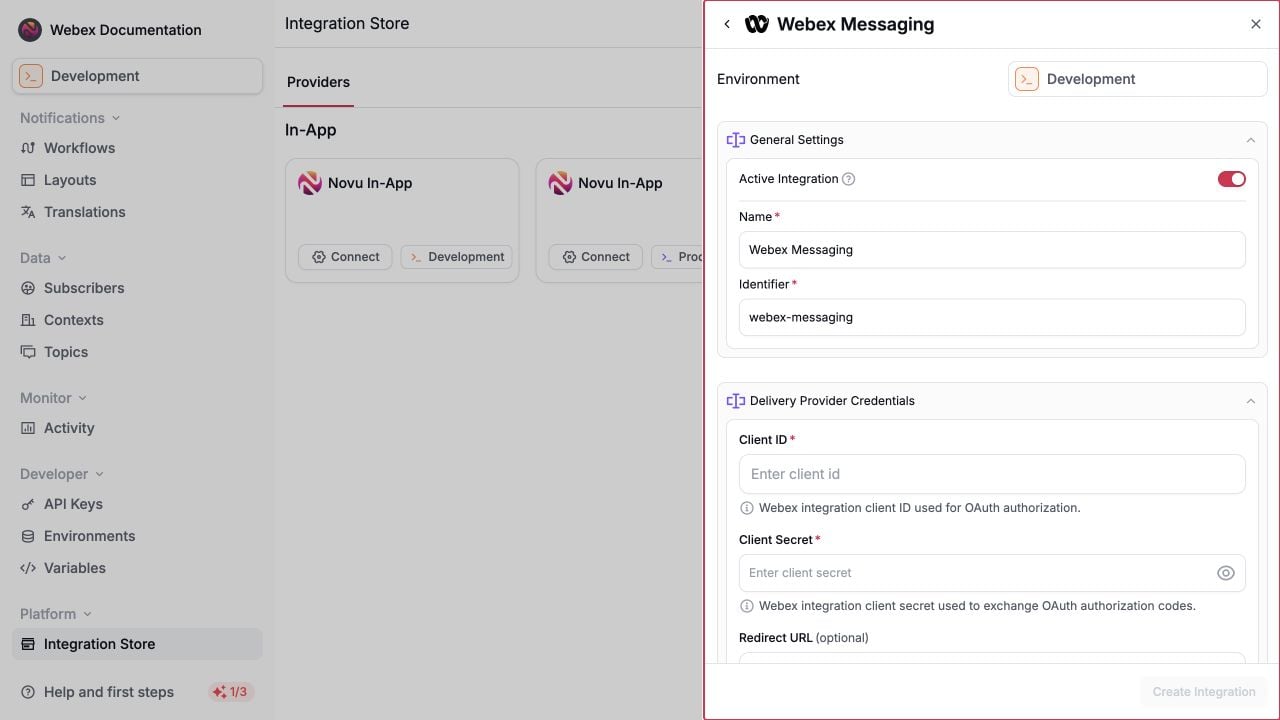
 Add the values from your Webex integration:
* **Client ID**: The Webex integration client ID.
* **Client Secret**: The Webex integration client secret.
* **Redirect URL** (optional): Where Novu sends the browser after OAuth succeeds. If omitted, Novu displays a success page.
* **Base URL** (optional): Leave empty to use `https://webexapis.com/v1`.
Add the values from your Webex integration:
* **Client ID**: The Webex integration client ID.
* **Client Secret**: The Webex integration client secret.
* **Redirect URL** (optional): Where Novu sends the browser after OAuth succeeds. If omitted, Novu displays a success page.
* **Base URL** (optional): Leave empty to use `https://webexapis.com/v1`.
 Save the integration. The examples below use `webex-messaging` as its integration identifier. Replace it if you chose a different identifier.
The optional **Redirect URL** in Novu is different from the Webex redirect URI. Webex must redirect to Novu's regional OAuth callback. The Novu field controls where the user goes after Novu finishes the callback.
## Connect a Webex organization
Create a channel connection before registering room or person endpoints. Providing your own `connectionIdentifier` makes it easy to reference the connection later.
The following example creates a shared connection for the `acme` context. Call it from your backend when an administrator or authorized user clicks **Connect Webex** in your application.
```typescript theme={null}
import { Novu } from '@novu/api';
const novu = new Novu({ secretKey: "" });
const response = await novu.integrations.generateConnectOAuthUrl({
integrationIdentifier: 'webex-messaging',
connectionIdentifier: 'webex-acme',
connectionMode: 'shared',
context: {
tenant: 'acme',
},
autoLinkUser: false,
});
```
```python theme={null}
import os
import novu_py
from novu_py import Novu
with Novu(secret_key=os.getenv("NOVU_SECRET_KEY", "")) as novu:
response = novu.integrations.generate_connect_o_auth_url(
generate_connect_oauth_url_request_dto={
"integration_identifier": "webex-messaging",
"connection_identifier": "webex-acme",
"connection_mode": novu_py.GenerateConnectOauthURLRequestDtoConnectionMode.SHARED,
"context": {
"tenant": "acme",
},
"auto_link_user": False,
}
)
```
```go theme={null}
import (
"context"
"os"
novugo "github.com/novuhq/novu-go"
"github.com/novuhq/novu-go/models/components"
)
s := novugo.New(novugo.WithSecurity(os.Getenv("NOVU_SECRET_KEY")))
response, err := s.Integrations.GenerateConnectOAuthURL(
context.Background(),
components.GenerateConnectOauthURLRequestDto{
IntegrationIdentifier: "webex-messaging",
ConnectionIdentifier: novugo.Pointer("webex-acme"),
ConnectionMode: components.GenerateConnectOauthURLRequestDtoConnectionModeShared.ToPointer(),
Context: map[string]components.GenerateConnectOauthURLRequestDtoContext{
"tenant": components.CreateGenerateConnectOauthURLRequestDtoContextStr("acme"),
},
AutoLinkUser: novugo.Pointer(false),
},
nil,
)
```
```php theme={null}
use novu;
use novu\Models\Components;
$sdk = novu\Novu::builder()->setSecurity('')->build();
$response = $sdk->integrations->generateConnectOAuthUrl(
generateConnectOauthUrlRequestDto: new Components\GenerateConnectOauthUrlRequestDto(
integrationIdentifier: 'webex-messaging',
connectionIdentifier: 'webex-acme',
context: [
'tenant' => 'acme',
],
connectionMode: Components\GenerateConnectOauthUrlRequestDtoConnectionMode::Shared,
autoLinkUser: false,
),
);
```
```csharp theme={null}
using Novu;
using Novu.Models.Components;
using System.Collections.Generic;
var sdk = new NovuSDK(secretKey: "");
var response = await sdk.Integrations.GenerateConnectOAuthUrlAsync(
generateConnectOauthUrlRequestDto: new GenerateConnectOauthUrlRequestDto() {
IntegrationIdentifier = "webex-messaging",
ConnectionIdentifier = "webex-acme",
ConnectionMode = GenerateConnectOauthUrlRequestDtoConnectionMode.Shared,
Context = new Dictionary() {
{ "tenant", GenerateConnectOauthUrlRequestDtoContext.CreateStr("acme") },
},
AutoLinkUser = false,
});
```
```java theme={null}
import co.novu.Novu;
import co.novu.models.components.*;
import java.util.Map;
Novu novu = Novu.builder().secretKey("").build();
var response = novu.integrations().generateConnectOAuthUrl()
.body(GenerateConnectOauthUrlRequestDto.builder()
.integrationIdentifier("webex-messaging")
.connectionIdentifier("webex-acme")
.connectionMode(GenerateConnectOauthUrlRequestDtoConnectionMode.SHARED)
.context(Map.ofEntries(
Map.entry("tenant", GenerateConnectOauthUrlRequestDtoContextUnion.of("acme"))))
.autoLinkUser(false)
.build())
.call();
```
```bash theme={null}
curl -L -X POST 'https://api.novu.co/v1/integrations/channel-connections/oauth' \
-H 'Content-Type: application/json' \
-H 'Authorization: ApiKey ' \
-d '{
"integrationIdentifier": "webex-messaging",
"connectionIdentifier": "webex-acme",
"connectionMode": "shared",
"context": {
"tenant": "acme"
},
"autoLinkUser": false
}'
```
Open the returned URL when the user is ready to authorize Webex:
```typescript theme={null}
window.open(response.result.url, '_blank');
```
The generated OAuth URL expires after 5 minutes. Generate a new URL each time a user starts the connection flow; do not cache it.
After authorization, Novu exchanges the code, reads the authorized person's Webex organization, and stores the access and refresh tokens on the connection. Novu refreshes the access token automatically before message delivery when it is close to expiring.
### Connect and link the current person in one flow
For a subscriber-scoped connection, set `autoLinkUser` to `true`. Novu creates the connection and a `webex_person` endpoint for the Webex person who completes OAuth.
```typescript theme={null}
const response = await novu.integrations.generateConnectOAuthUrl({
integrationIdentifier: 'webex-messaging',
connectionIdentifier: 'webex-user-123',
connectionMode: 'subscriber',
subscriberId: 'user-123',
autoLinkUser: true,
});
```
### Link a subscriber to an existing connection
Use a separate link-user flow when the Webex organization is already connected and another subscriber needs a personal endpoint.
```typescript theme={null}
import { Novu } from '@novu/api';
const novu = new Novu({ secretKey: "" });
const response = await novu.integrations.generateLinkUserOAuthUrl({
integrationIdentifier: 'webex-messaging',
subscriberId: 'user-123',
connectionIdentifier: 'webex-acme',
context: {
tenant: 'acme',
},
});
```
```python theme={null}
import os
from novu_py import Novu
with Novu(secret_key=os.getenv("NOVU_SECRET_KEY", "")) as novu:
response = novu.integrations.generate_link_user_o_auth_url(
generate_link_user_oauth_url_request_dto={
"integration_identifier": "webex-messaging",
"subscriber_id": "user-123",
"connection_identifier": "webex-acme",
"context": {
"tenant": "acme",
},
}
)
```
```go theme={null}
import (
"context"
"os"
novugo "github.com/novuhq/novu-go"
"github.com/novuhq/novu-go/models/components"
)
s := novugo.New(novugo.WithSecurity(os.Getenv("NOVU_SECRET_KEY")))
response, err := s.Integrations.GenerateLinkUserOAuthURL(
context.Background(),
components.GenerateLinkUserOauthURLRequestDto{
IntegrationIdentifier: "webex-messaging",
SubscriberID: "user-123",
ConnectionIdentifier: novugo.Pointer("webex-acme"),
Context: map[string]components.GenerateLinkUserOauthURLRequestDtoContext{
"tenant": components.CreateGenerateLinkUserOauthURLRequestDtoContextStr("acme"),
},
},
nil,
)
```
```php theme={null}
use novu;
use novu\Models\Components;
$sdk = novu\Novu::builder()->setSecurity('')->build();
$response = $sdk->integrations->generateLinkUserOAuthUrl(
generateLinkUserOauthUrlRequestDto: new Components\GenerateLinkUserOauthUrlRequestDto(
subscriberId: 'user-123',
integrationIdentifier: 'webex-messaging',
connectionIdentifier: 'webex-acme',
context: [
'tenant' => 'acme',
],
),
);
```
```csharp theme={null}
using Novu;
using Novu.Models.Components;
using System.Collections.Generic;
var sdk = new NovuSDK(secretKey: "");
var response = await sdk.Integrations.GenerateLinkUserOAuthUrlAsync(
generateLinkUserOauthUrlRequestDto: new GenerateLinkUserOauthUrlRequestDto() {
IntegrationIdentifier = "webex-messaging",
SubscriberId = "user-123",
ConnectionIdentifier = "webex-acme",
Context = new Dictionary() {
{ "tenant", GenerateLinkUserOauthUrlRequestDtoContext.CreateStr("acme") },
},
});
```
```java theme={null}
import co.novu.Novu;
import co.novu.models.components.*;
import java.util.Map;
Novu novu = Novu.builder().secretKey("").build();
var response = novu.integrations().generateLinkUserOAuthUrl()
.body(GenerateLinkUserOauthUrlRequestDto.builder()
.integrationIdentifier("webex-messaging")
.subscriberId("user-123")
.connectionIdentifier("webex-acme")
.context(Map.ofEntries(
Map.entry("tenant", GenerateLinkUserOauthUrlRequestDtoContextUnion.of("acme"))))
.build())
.call();
```
```bash theme={null}
curl -L -X POST 'https://api.novu.co/v1/integrations/channel-endpoints/oauth' \
-H 'Content-Type: application/json' \
-H 'Authorization: ApiKey ' \
-d '{
"integrationIdentifier": "webex-messaging",
"subscriberId": "user-123",
"connectionIdentifier": "webex-acme",
"context": {
"tenant": "acme"
}
}'
```
The subscriber signs in to Webex through the returned URL. Novu reads their identity from `people/me` and creates a `webex_person` endpoint linked to the existing connection.
## Choose delivery destinations
Every Webex endpoint must reference a Webex Messaging connection through `connectionIdentifier`. If the connection has a Novu context, the endpoint must use the same context.
### Send to a Webex room
Use the [Webex Rooms API](https://developer.webex.com/docs/api/v1/rooms) or a room picker in your application to obtain the room ID. The authorizing Webex user must be a member of the room.
Create a `webex_room` endpoint for the subscriber and context that should receive messages:
```typescript theme={null}
await novu.channelEndpoints.create({
identifier: 'webex-acme-alerts',
integrationIdentifier: 'webex-messaging',
connectionIdentifier: 'webex-acme',
subscriberId: 'user-123',
context: {
tenant: 'acme',
},
type: 'webex_room',
endpoint: {
roomId: '',
},
});
```
```python theme={null}
import os
from novu_py import Novu
with Novu(secret_key=os.getenv("NOVU_SECRET_KEY", "")) as novu:
novu.channel_endpoints.create(request_body={
"identifier": "webex-acme-alerts",
"integration_identifier": "webex-messaging",
"connection_identifier": "webex-acme",
"subscriber_id": "user-123",
"context": {
"tenant": "acme",
},
"type": "webex_room",
"endpoint": {
"room_id": "",
},
})
```
```go theme={null}
import (
"context"
"os"
novugo "github.com/novuhq/novu-go"
"github.com/novuhq/novu-go/models/components"
"github.com/novuhq/novu-go/models/operations"
)
s := novugo.New(novugo.WithSecurity(os.Getenv("NOVU_SECRET_KEY")))
response, err := s.ChannelEndpoints.Create(
context.Background(),
operations.CreateChannelEndpointsControllerCreateChannelEndpointRequestBodyWebexRoom(
components.CreateWebexRoomEndpointDto{
Identifier: novugo.Pointer("webex-acme-alerts"),
IntegrationIdentifier: "webex-messaging",
ConnectionIdentifier: "webex-acme",
SubscriberID: "user-123",
Context: map[string]components.CreateWebexRoomEndpointDtoContext{
"tenant": components.CreateCreateWebexRoomEndpointDtoContextStr("acme"),
},
Endpoint: components.WebexRoomEndpointDto{
RoomID: "",
},
},
),
nil,
)
```
```php theme={null}
use novu;
use novu\Models\Components;
$sdk = novu\Novu::builder()->setSecurity('')->build();
$sdk->channelEndpoints->create(
requestBody: new Components\CreateWebexRoomEndpointDto(
identifier: 'webex-acme-alerts',
integrationIdentifier: 'webex-messaging',
connectionIdentifier: 'webex-acme',
subscriberId: 'user-123',
context: [
'tenant' => 'acme',
],
type: Components\CreateWebexRoomEndpointDtoType::WebexRoom,
endpoint: new Components\WebexRoomEndpointDto(
roomId: '',
),
),
);
```
```csharp theme={null}
using Novu;
using Novu.Models.Components;
using Novu.Models.Requests;
using System.Collections.Generic;
var sdk = new NovuSDK(secretKey: "");
await sdk.ChannelEndpoints.CreateAsync(
requestBody: ChannelEndpointsControllerCreateChannelEndpointRequestBody.CreateWebexRoom(
new CreateWebexRoomEndpointDto() {
Identifier = "webex-acme-alerts",
IntegrationIdentifier = "webex-messaging",
ConnectionIdentifier = "webex-acme",
SubscriberId = "user-123",
Context = new Dictionary() {
{ "tenant", CreateWebexRoomEndpointDtoContext.CreateStr("acme") },
},
Endpoint = new WebexRoomEndpointDto() {
RoomId = "",
},
}));
```
```java theme={null}
import co.novu.Novu;
import co.novu.models.components.*;
import java.util.Map;
Novu novu = Novu.builder().secretKey("").build();
novu.channelEndpoints().create()
.requestBody(CreateWebexRoomEndpointDto.builder()
.identifier("webex-acme-alerts")
.integrationIdentifier("webex-messaging")
.connectionIdentifier("webex-acme")
.subscriberId("user-123")
.context(Map.ofEntries(
Map.entry("tenant", CreateWebexRoomEndpointDtoContextUnion.of("acme"))))
.type(CreateWebexRoomEndpointDtoType.WEBEX_ROOM)
.endpoint(WebexRoomEndpointDto.builder()
.roomId("")
.build())
.build())
.call();
```
```bash theme={null}
curl -L -X POST 'https://api.novu.co/v1/channel-endpoints' \
-H 'Content-Type: application/json' \
-H 'Authorization: ApiKey ' \
-d '{
"identifier": "webex-acme-alerts",
"integrationIdentifier": "webex-messaging",
"connectionIdentifier": "webex-acme",
"subscriberId": "user-123",
"context": {
"tenant": "acme"
},
"type": "webex_room",
"endpoint": {
"roomId": ""
}
}'
```
To send every notification from an endpoint as a reply in an existing Webex thread, add the parent message ID:
```json theme={null}
{
"type": "webex_room",
"endpoint": {
"roomId": "",
"parentId": ""
}
}
```
### Send to a Webex person
The recommended approach is to use `autoLinkUser` or the [link-user OAuth flow](#link-a-subscriber-to-an-existing-connection). These flows identify the person who signs in and create the endpoint automatically.
You can also create a `webex_person` endpoint manually. Provide exactly one of `personId` or `personEmail`.
```typescript theme={null}
await novu.channelEndpoints.create({
identifier: 'webex-user-123',
integrationIdentifier: 'webex-messaging',
connectionIdentifier: 'webex-acme',
subscriberId: 'user-123',
context: {
tenant: 'acme',
},
type: 'webex_person',
endpoint: {
personEmail: 'user@example.com',
},
});
```
```python theme={null}
import os
from novu_py import Novu
with Novu(secret_key=os.getenv("NOVU_SECRET_KEY", "")) as novu:
novu.channel_endpoints.create(request_body={
"identifier": "webex-user-123",
"integration_identifier": "webex-messaging",
"connection_identifier": "webex-acme",
"subscriber_id": "user-123",
"context": {
"tenant": "acme",
},
"type": "webex_person",
"endpoint": {
"person_email": "user@example.com",
},
})
```
```go theme={null}
import (
"context"
"os"
novugo "github.com/novuhq/novu-go"
"github.com/novuhq/novu-go/models/components"
"github.com/novuhq/novu-go/models/operations"
)
s := novugo.New(novugo.WithSecurity(os.Getenv("NOVU_SECRET_KEY")))
response, err := s.ChannelEndpoints.Create(
context.Background(),
operations.CreateChannelEndpointsControllerCreateChannelEndpointRequestBodyWebexPerson(
components.CreateWebexPersonEndpointDto{
Identifier: novugo.Pointer("webex-user-123"),
IntegrationIdentifier: "webex-messaging",
ConnectionIdentifier: "webex-acme",
SubscriberID: "user-123",
Context: map[string]components.CreateWebexPersonEndpointDtoContext{
"tenant": components.CreateCreateWebexPersonEndpointDtoContextStr("acme"),
},
Endpoint: components.WebexPersonEndpointDto{
PersonEmail: novugo.Pointer("user@example.com"),
},
},
),
nil,
)
```
```php theme={null}
use novu;
use novu\Models\Components;
$sdk = novu\Novu::builder()->setSecurity('')->build();
$sdk->channelEndpoints->create(
requestBody: new Components\CreateWebexPersonEndpointDto(
identifier: 'webex-user-123',
integrationIdentifier: 'webex-messaging',
connectionIdentifier: 'webex-acme',
subscriberId: 'user-123',
context: [
'tenant' => 'acme',
],
type: Components\CreateWebexPersonEndpointDtoType::WebexPerson,
endpoint: new Components\WebexPersonEndpointDto(
personEmail: 'user@example.com',
),
),
);
```
```csharp theme={null}
using Novu;
using Novu.Models.Components;
using Novu.Models.Requests;
using System.Collections.Generic;
var sdk = new NovuSDK(secretKey: "");
await sdk.ChannelEndpoints.CreateAsync(
requestBody: ChannelEndpointsControllerCreateChannelEndpointRequestBody.CreateWebexPerson(
new CreateWebexPersonEndpointDto() {
Identifier = "webex-user-123",
IntegrationIdentifier = "webex-messaging",
ConnectionIdentifier = "webex-acme",
SubscriberId = "user-123",
Context = new Dictionary() {
{ "tenant", CreateWebexPersonEndpointDtoContext.CreateStr("acme") },
},
Endpoint = new WebexPersonEndpointDto() {
PersonEmail = "user@example.com",
},
}));
```
```java theme={null}
import co.novu.Novu;
import co.novu.models.components.*;
import java.util.Map;
Novu novu = Novu.builder().secretKey("").build();
novu.channelEndpoints().create()
.requestBody(CreateWebexPersonEndpointDto.builder()
.identifier("webex-user-123")
.integrationIdentifier("webex-messaging")
.connectionIdentifier("webex-acme")
.subscriberId("user-123")
.context(Map.ofEntries(
Map.entry("tenant", CreateWebexPersonEndpointDtoContextUnion.of("acme"))))
.type(CreateWebexPersonEndpointDtoType.WEBEX_PERSON)
.endpoint(WebexPersonEndpointDto.builder()
.personEmail("user@example.com")
.build())
.build())
.call();
```
```bash theme={null}
curl -L -X POST 'https://api.novu.co/v1/channel-endpoints' \
-H 'Content-Type: application/json' \
-H 'Authorization: ApiKey ' \
-d '{
"identifier": "webex-user-123",
"integrationIdentifier": "webex-messaging",
"connectionIdentifier": "webex-acme",
"subscriberId": "user-123",
"context": {
"tenant": "acme"
},
"type": "webex_person",
"endpoint": {
"personEmail": "user@example.com"
}
}'
```
## Send notifications
Create a workflow with a **Chat** step and select the Webex Messaging integration. After the matching connection and endpoint exist, trigger the workflow with the same subscriber and context.
```typescript theme={null}
import { Novu } from '@novu/api';
const novu = new Novu({ secretKey: "" });
await novu.trigger({
workflowId: 'incident-alert',
to: {
subscriberId: 'user-123',
},
context: {
tenant: 'acme',
},
payload: {
service: 'checkout',
status: 'degraded',
},
});
```
```python theme={null}
import os
import novu_py
from novu_py import Novu
with Novu(secret_key=os.getenv("NOVU_SECRET_KEY", "")) as novu:
novu.trigger(trigger_event_request_dto=novu_py.TriggerEventRequestDto(
workflow_id="incident-alert",
to={"subscriber_id": "user-123"},
context={
"tenant": "acme",
},
payload={
"service": "checkout",
"status": "degraded",
},
))
```
```go theme={null}
import (
"context"
"os"
novugo "github.com/novuhq/novu-go"
"github.com/novuhq/novu-go/models/components"
)
s := novugo.New(novugo.WithSecurity(os.Getenv("NOVU_SECRET_KEY")))
response, err := s.Trigger(context.Background(), components.TriggerEventRequestDto{
WorkflowID: "incident-alert",
To: components.CreateToStr("user-123"),
Context: map[string]components.TriggerEventRequestDtoContext{
"tenant": components.CreateTriggerEventRequestDtoContextStr("acme"),
},
Payload: map[string]any{
"service": "checkout",
"status": "degraded",
},
}, nil)
```
```php theme={null}
use novu;
use novu\Models\Components;
$sdk = novu\Novu::builder()->setSecurity('')->build();
$sdk->trigger(
triggerEventRequestDto: new Components\TriggerEventRequestDto(
workflowId: 'incident-alert',
to: 'user-123',
context: [
'tenant' => 'acme',
],
payload: [
'service' => 'checkout',
'status' => 'degraded',
],
),
);
```
```csharp theme={null}
using Novu;
using Novu.Models.Components;
using System.Collections.Generic;
var sdk = new NovuSDK(secretKey: "");
await sdk.TriggerAsync(triggerEventRequestDto: new TriggerEventRequestDto() {
WorkflowId = "incident-alert",
To = To.CreateStr("user-123"),
Context = new Dictionary() {
{ "tenant", TriggerEventRequestDtoContext.CreateStr("acme") },
},
Payload = new Dictionary() {
{ "service", "checkout" },
{ "status", "degraded" },
},
});
```
```java theme={null}
import co.novu.Novu;
import co.novu.models.components.*;
import java.util.Map;
Novu novu = Novu.builder().secretKey("").build();
novu.trigger()
.body(TriggerEventRequestDto.builder()
.workflowId("incident-alert")
.to(To2.of("user-123"))
.context(Map.ofEntries(
Map.entry("tenant", TriggerEventRequestDtoContextUnion.of("acme"))))
.payload(Map.ofEntries(
Map.entry("service", "checkout"),
Map.entry("status", "degraded")))
.build())
.call();
```
```bash theme={null}
curl -L -X POST 'https://api.novu.co/v1/events/trigger' \
-H 'Content-Type: application/json' \
-H 'Authorization: ApiKey ' \
-d '{
"name": "incident-alert",
"to": {
"subscriberId": "user-123"
},
"context": {
"tenant": "acme"
},
"payload": {
"service": "checkout",
"status": "degraded"
}
}'
```
When the workflow runs, Novu resolves matching Webex endpoints, obtains a valid access token from the referenced connection, and posts the Chat step body to the Webex Messages API.
## Format Webex messages
The dashboard Chat step sends its body as Webex `text`. Use [trigger overrides](/platform/integrations/trigger-overrides) when you need Webex-specific message fields such as `markdown`, `files`, or `attachments`.
The example below adds Webex Markdown to a specific Chat step:
```typescript theme={null}
await novu.trigger({
workflowId: 'incident-alert',
to: {
subscriberId: 'user-123',
},
context: {
tenant: 'acme',
},
payload: {
service: 'checkout',
status: 'degraded',
},
overrides: {
steps: {
'webex-chat-step': {
providers: {
'webex-messaging': {
_passthrough: {
body: {
markdown: '**Checkout** is currently _degraded_.',
},
},
},
},
},
},
},
});
```
Replace `webex-chat-step` with the Chat step identifier from your workflow.
Routing fields come only from the registered channel endpoint. Webex passthrough data cannot add, remove, or override `roomId`, `parentId`, `toPersonId`, or `toPersonEmail`.
For supported Webex payload fields, see [Create a Message](https://developer.webex.com/messaging/docs/api/v1/messages/create-a-message).
## Troubleshooting
| Error or symptom | What to check |
| ---------------------------------------- | -------------------------------------------------------------------------------------------------------------- |
| OAuth fails with an invalid redirect URI | Confirm the Webex integration contains the Novu callback for the correct region. The value must match exactly. |
| `WEBEX_INVALID_CREDENTIALS` | Reconnect Webex. The access or refresh token may be invalid or expired. |
| `WEBEX_INSUFFICIENT_PERMISSIONS` | Confirm the required scopes were selected in Webex and requested during OAuth. |
| `WEBEX_DESTINATION_NOT_FOUND` | Verify the room or person identifier and confirm the authorizing user can access that destination. |
| Endpoint context mismatch | Use the same Novu `context` values on the endpoint and its referenced channel connection. |
| `WEBEX_RATE_LIMITED` | Wait for the `retry-after` interval reported by Webex before trying again. |
## Related
Review Webex message destinations, content fields, and API behavior.
Save the integration. The examples below use `webex-messaging` as its integration identifier. Replace it if you chose a different identifier.
The optional **Redirect URL** in Novu is different from the Webex redirect URI. Webex must redirect to Novu's regional OAuth callback. The Novu field controls where the user goes after Novu finishes the callback.
## Connect a Webex organization
Create a channel connection before registering room or person endpoints. Providing your own `connectionIdentifier` makes it easy to reference the connection later.
The following example creates a shared connection for the `acme` context. Call it from your backend when an administrator or authorized user clicks **Connect Webex** in your application.
```typescript theme={null}
import { Novu } from '@novu/api';
const novu = new Novu({ secretKey: "" });
const response = await novu.integrations.generateConnectOAuthUrl({
integrationIdentifier: 'webex-messaging',
connectionIdentifier: 'webex-acme',
connectionMode: 'shared',
context: {
tenant: 'acme',
},
autoLinkUser: false,
});
```
```python theme={null}
import os
import novu_py
from novu_py import Novu
with Novu(secret_key=os.getenv("NOVU_SECRET_KEY", "")) as novu:
response = novu.integrations.generate_connect_o_auth_url(
generate_connect_oauth_url_request_dto={
"integration_identifier": "webex-messaging",
"connection_identifier": "webex-acme",
"connection_mode": novu_py.GenerateConnectOauthURLRequestDtoConnectionMode.SHARED,
"context": {
"tenant": "acme",
},
"auto_link_user": False,
}
)
```
```go theme={null}
import (
"context"
"os"
novugo "github.com/novuhq/novu-go"
"github.com/novuhq/novu-go/models/components"
)
s := novugo.New(novugo.WithSecurity(os.Getenv("NOVU_SECRET_KEY")))
response, err := s.Integrations.GenerateConnectOAuthURL(
context.Background(),
components.GenerateConnectOauthURLRequestDto{
IntegrationIdentifier: "webex-messaging",
ConnectionIdentifier: novugo.Pointer("webex-acme"),
ConnectionMode: components.GenerateConnectOauthURLRequestDtoConnectionModeShared.ToPointer(),
Context: map[string]components.GenerateConnectOauthURLRequestDtoContext{
"tenant": components.CreateGenerateConnectOauthURLRequestDtoContextStr("acme"),
},
AutoLinkUser: novugo.Pointer(false),
},
nil,
)
```
```php theme={null}
use novu;
use novu\Models\Components;
$sdk = novu\Novu::builder()->setSecurity('')->build();
$response = $sdk->integrations->generateConnectOAuthUrl(
generateConnectOauthUrlRequestDto: new Components\GenerateConnectOauthUrlRequestDto(
integrationIdentifier: 'webex-messaging',
connectionIdentifier: 'webex-acme',
context: [
'tenant' => 'acme',
],
connectionMode: Components\GenerateConnectOauthUrlRequestDtoConnectionMode::Shared,
autoLinkUser: false,
),
);
```
```csharp theme={null}
using Novu;
using Novu.Models.Components;
using System.Collections.Generic;
var sdk = new NovuSDK(secretKey: "");
var response = await sdk.Integrations.GenerateConnectOAuthUrlAsync(
generateConnectOauthUrlRequestDto: new GenerateConnectOauthUrlRequestDto() {
IntegrationIdentifier = "webex-messaging",
ConnectionIdentifier = "webex-acme",
ConnectionMode = GenerateConnectOauthUrlRequestDtoConnectionMode.Shared,
Context = new Dictionary() {
{ "tenant", GenerateConnectOauthUrlRequestDtoContext.CreateStr("acme") },
},
AutoLinkUser = false,
});
```
```java theme={null}
import co.novu.Novu;
import co.novu.models.components.*;
import java.util.Map;
Novu novu = Novu.builder().secretKey("").build();
var response = novu.integrations().generateConnectOAuthUrl()
.body(GenerateConnectOauthUrlRequestDto.builder()
.integrationIdentifier("webex-messaging")
.connectionIdentifier("webex-acme")
.connectionMode(GenerateConnectOauthUrlRequestDtoConnectionMode.SHARED)
.context(Map.ofEntries(
Map.entry("tenant", GenerateConnectOauthUrlRequestDtoContextUnion.of("acme"))))
.autoLinkUser(false)
.build())
.call();
```
```bash theme={null}
curl -L -X POST 'https://api.novu.co/v1/integrations/channel-connections/oauth' \
-H 'Content-Type: application/json' \
-H 'Authorization: ApiKey ' \
-d '{
"integrationIdentifier": "webex-messaging",
"connectionIdentifier": "webex-acme",
"connectionMode": "shared",
"context": {
"tenant": "acme"
},
"autoLinkUser": false
}'
```
Open the returned URL when the user is ready to authorize Webex:
```typescript theme={null}
window.open(response.result.url, '_blank');
```
The generated OAuth URL expires after 5 minutes. Generate a new URL each time a user starts the connection flow; do not cache it.
After authorization, Novu exchanges the code, reads the authorized person's Webex organization, and stores the access and refresh tokens on the connection. Novu refreshes the access token automatically before message delivery when it is close to expiring.
### Connect and link the current person in one flow
For a subscriber-scoped connection, set `autoLinkUser` to `true`. Novu creates the connection and a `webex_person` endpoint for the Webex person who completes OAuth.
```typescript theme={null}
const response = await novu.integrations.generateConnectOAuthUrl({
integrationIdentifier: 'webex-messaging',
connectionIdentifier: 'webex-user-123',
connectionMode: 'subscriber',
subscriberId: 'user-123',
autoLinkUser: true,
});
```
### Link a subscriber to an existing connection
Use a separate link-user flow when the Webex organization is already connected and another subscriber needs a personal endpoint.
```typescript theme={null}
import { Novu } from '@novu/api';
const novu = new Novu({ secretKey: "" });
const response = await novu.integrations.generateLinkUserOAuthUrl({
integrationIdentifier: 'webex-messaging',
subscriberId: 'user-123',
connectionIdentifier: 'webex-acme',
context: {
tenant: 'acme',
},
});
```
```python theme={null}
import os
from novu_py import Novu
with Novu(secret_key=os.getenv("NOVU_SECRET_KEY", "")) as novu:
response = novu.integrations.generate_link_user_o_auth_url(
generate_link_user_oauth_url_request_dto={
"integration_identifier": "webex-messaging",
"subscriber_id": "user-123",
"connection_identifier": "webex-acme",
"context": {
"tenant": "acme",
},
}
)
```
```go theme={null}
import (
"context"
"os"
novugo "github.com/novuhq/novu-go"
"github.com/novuhq/novu-go/models/components"
)
s := novugo.New(novugo.WithSecurity(os.Getenv("NOVU_SECRET_KEY")))
response, err := s.Integrations.GenerateLinkUserOAuthURL(
context.Background(),
components.GenerateLinkUserOauthURLRequestDto{
IntegrationIdentifier: "webex-messaging",
SubscriberID: "user-123",
ConnectionIdentifier: novugo.Pointer("webex-acme"),
Context: map[string]components.GenerateLinkUserOauthURLRequestDtoContext{
"tenant": components.CreateGenerateLinkUserOauthURLRequestDtoContextStr("acme"),
},
},
nil,
)
```
```php theme={null}
use novu;
use novu\Models\Components;
$sdk = novu\Novu::builder()->setSecurity('')->build();
$response = $sdk->integrations->generateLinkUserOAuthUrl(
generateLinkUserOauthUrlRequestDto: new Components\GenerateLinkUserOauthUrlRequestDto(
subscriberId: 'user-123',
integrationIdentifier: 'webex-messaging',
connectionIdentifier: 'webex-acme',
context: [
'tenant' => 'acme',
],
),
);
```
```csharp theme={null}
using Novu;
using Novu.Models.Components;
using System.Collections.Generic;
var sdk = new NovuSDK(secretKey: "");
var response = await sdk.Integrations.GenerateLinkUserOAuthUrlAsync(
generateLinkUserOauthUrlRequestDto: new GenerateLinkUserOauthUrlRequestDto() {
IntegrationIdentifier = "webex-messaging",
SubscriberId = "user-123",
ConnectionIdentifier = "webex-acme",
Context = new Dictionary() {
{ "tenant", GenerateLinkUserOauthUrlRequestDtoContext.CreateStr("acme") },
},
});
```
```java theme={null}
import co.novu.Novu;
import co.novu.models.components.*;
import java.util.Map;
Novu novu = Novu.builder().secretKey("").build();
var response = novu.integrations().generateLinkUserOAuthUrl()
.body(GenerateLinkUserOauthUrlRequestDto.builder()
.integrationIdentifier("webex-messaging")
.subscriberId("user-123")
.connectionIdentifier("webex-acme")
.context(Map.ofEntries(
Map.entry("tenant", GenerateLinkUserOauthUrlRequestDtoContextUnion.of("acme"))))
.build())
.call();
```
```bash theme={null}
curl -L -X POST 'https://api.novu.co/v1/integrations/channel-endpoints/oauth' \
-H 'Content-Type: application/json' \
-H 'Authorization: ApiKey ' \
-d '{
"integrationIdentifier": "webex-messaging",
"subscriberId": "user-123",
"connectionIdentifier": "webex-acme",
"context": {
"tenant": "acme"
}
}'
```
The subscriber signs in to Webex through the returned URL. Novu reads their identity from `people/me` and creates a `webex_person` endpoint linked to the existing connection.
## Choose delivery destinations
Every Webex endpoint must reference a Webex Messaging connection through `connectionIdentifier`. If the connection has a Novu context, the endpoint must use the same context.
### Send to a Webex room
Use the [Webex Rooms API](https://developer.webex.com/docs/api/v1/rooms) or a room picker in your application to obtain the room ID. The authorizing Webex user must be a member of the room.
Create a `webex_room` endpoint for the subscriber and context that should receive messages:
```typescript theme={null}
await novu.channelEndpoints.create({
identifier: 'webex-acme-alerts',
integrationIdentifier: 'webex-messaging',
connectionIdentifier: 'webex-acme',
subscriberId: 'user-123',
context: {
tenant: 'acme',
},
type: 'webex_room',
endpoint: {
roomId: '',
},
});
```
```python theme={null}
import os
from novu_py import Novu
with Novu(secret_key=os.getenv("NOVU_SECRET_KEY", "")) as novu:
novu.channel_endpoints.create(request_body={
"identifier": "webex-acme-alerts",
"integration_identifier": "webex-messaging",
"connection_identifier": "webex-acme",
"subscriber_id": "user-123",
"context": {
"tenant": "acme",
},
"type": "webex_room",
"endpoint": {
"room_id": "",
},
})
```
```go theme={null}
import (
"context"
"os"
novugo "github.com/novuhq/novu-go"
"github.com/novuhq/novu-go/models/components"
"github.com/novuhq/novu-go/models/operations"
)
s := novugo.New(novugo.WithSecurity(os.Getenv("NOVU_SECRET_KEY")))
response, err := s.ChannelEndpoints.Create(
context.Background(),
operations.CreateChannelEndpointsControllerCreateChannelEndpointRequestBodyWebexRoom(
components.CreateWebexRoomEndpointDto{
Identifier: novugo.Pointer("webex-acme-alerts"),
IntegrationIdentifier: "webex-messaging",
ConnectionIdentifier: "webex-acme",
SubscriberID: "user-123",
Context: map[string]components.CreateWebexRoomEndpointDtoContext{
"tenant": components.CreateCreateWebexRoomEndpointDtoContextStr("acme"),
},
Endpoint: components.WebexRoomEndpointDto{
RoomID: "",
},
},
),
nil,
)
```
```php theme={null}
use novu;
use novu\Models\Components;
$sdk = novu\Novu::builder()->setSecurity('')->build();
$sdk->channelEndpoints->create(
requestBody: new Components\CreateWebexRoomEndpointDto(
identifier: 'webex-acme-alerts',
integrationIdentifier: 'webex-messaging',
connectionIdentifier: 'webex-acme',
subscriberId: 'user-123',
context: [
'tenant' => 'acme',
],
type: Components\CreateWebexRoomEndpointDtoType::WebexRoom,
endpoint: new Components\WebexRoomEndpointDto(
roomId: '',
),
),
);
```
```csharp theme={null}
using Novu;
using Novu.Models.Components;
using Novu.Models.Requests;
using System.Collections.Generic;
var sdk = new NovuSDK(secretKey: "");
await sdk.ChannelEndpoints.CreateAsync(
requestBody: ChannelEndpointsControllerCreateChannelEndpointRequestBody.CreateWebexRoom(
new CreateWebexRoomEndpointDto() {
Identifier = "webex-acme-alerts",
IntegrationIdentifier = "webex-messaging",
ConnectionIdentifier = "webex-acme",
SubscriberId = "user-123",
Context = new Dictionary() {
{ "tenant", CreateWebexRoomEndpointDtoContext.CreateStr("acme") },
},
Endpoint = new WebexRoomEndpointDto() {
RoomId = "",
},
}));
```
```java theme={null}
import co.novu.Novu;
import co.novu.models.components.*;
import java.util.Map;
Novu novu = Novu.builder().secretKey("").build();
novu.channelEndpoints().create()
.requestBody(CreateWebexRoomEndpointDto.builder()
.identifier("webex-acme-alerts")
.integrationIdentifier("webex-messaging")
.connectionIdentifier("webex-acme")
.subscriberId("user-123")
.context(Map.ofEntries(
Map.entry("tenant", CreateWebexRoomEndpointDtoContextUnion.of("acme"))))
.type(CreateWebexRoomEndpointDtoType.WEBEX_ROOM)
.endpoint(WebexRoomEndpointDto.builder()
.roomId("")
.build())
.build())
.call();
```
```bash theme={null}
curl -L -X POST 'https://api.novu.co/v1/channel-endpoints' \
-H 'Content-Type: application/json' \
-H 'Authorization: ApiKey ' \
-d '{
"identifier": "webex-acme-alerts",
"integrationIdentifier": "webex-messaging",
"connectionIdentifier": "webex-acme",
"subscriberId": "user-123",
"context": {
"tenant": "acme"
},
"type": "webex_room",
"endpoint": {
"roomId": ""
}
}'
```
To send every notification from an endpoint as a reply in an existing Webex thread, add the parent message ID:
```json theme={null}
{
"type": "webex_room",
"endpoint": {
"roomId": "",
"parentId": ""
}
}
```
### Send to a Webex person
The recommended approach is to use `autoLinkUser` or the [link-user OAuth flow](#link-a-subscriber-to-an-existing-connection). These flows identify the person who signs in and create the endpoint automatically.
You can also create a `webex_person` endpoint manually. Provide exactly one of `personId` or `personEmail`.
```typescript theme={null}
await novu.channelEndpoints.create({
identifier: 'webex-user-123',
integrationIdentifier: 'webex-messaging',
connectionIdentifier: 'webex-acme',
subscriberId: 'user-123',
context: {
tenant: 'acme',
},
type: 'webex_person',
endpoint: {
personEmail: 'user@example.com',
},
});
```
```python theme={null}
import os
from novu_py import Novu
with Novu(secret_key=os.getenv("NOVU_SECRET_KEY", "")) as novu:
novu.channel_endpoints.create(request_body={
"identifier": "webex-user-123",
"integration_identifier": "webex-messaging",
"connection_identifier": "webex-acme",
"subscriber_id": "user-123",
"context": {
"tenant": "acme",
},
"type": "webex_person",
"endpoint": {
"person_email": "user@example.com",
},
})
```
```go theme={null}
import (
"context"
"os"
novugo "github.com/novuhq/novu-go"
"github.com/novuhq/novu-go/models/components"
"github.com/novuhq/novu-go/models/operations"
)
s := novugo.New(novugo.WithSecurity(os.Getenv("NOVU_SECRET_KEY")))
response, err := s.ChannelEndpoints.Create(
context.Background(),
operations.CreateChannelEndpointsControllerCreateChannelEndpointRequestBodyWebexPerson(
components.CreateWebexPersonEndpointDto{
Identifier: novugo.Pointer("webex-user-123"),
IntegrationIdentifier: "webex-messaging",
ConnectionIdentifier: "webex-acme",
SubscriberID: "user-123",
Context: map[string]components.CreateWebexPersonEndpointDtoContext{
"tenant": components.CreateCreateWebexPersonEndpointDtoContextStr("acme"),
},
Endpoint: components.WebexPersonEndpointDto{
PersonEmail: novugo.Pointer("user@example.com"),
},
},
),
nil,
)
```
```php theme={null}
use novu;
use novu\Models\Components;
$sdk = novu\Novu::builder()->setSecurity('')->build();
$sdk->channelEndpoints->create(
requestBody: new Components\CreateWebexPersonEndpointDto(
identifier: 'webex-user-123',
integrationIdentifier: 'webex-messaging',
connectionIdentifier: 'webex-acme',
subscriberId: 'user-123',
context: [
'tenant' => 'acme',
],
type: Components\CreateWebexPersonEndpointDtoType::WebexPerson,
endpoint: new Components\WebexPersonEndpointDto(
personEmail: 'user@example.com',
),
),
);
```
```csharp theme={null}
using Novu;
using Novu.Models.Components;
using Novu.Models.Requests;
using System.Collections.Generic;
var sdk = new NovuSDK(secretKey: "");
await sdk.ChannelEndpoints.CreateAsync(
requestBody: ChannelEndpointsControllerCreateChannelEndpointRequestBody.CreateWebexPerson(
new CreateWebexPersonEndpointDto() {
Identifier = "webex-user-123",
IntegrationIdentifier = "webex-messaging",
ConnectionIdentifier = "webex-acme",
SubscriberId = "user-123",
Context = new Dictionary() {
{ "tenant", CreateWebexPersonEndpointDtoContext.CreateStr("acme") },
},
Endpoint = new WebexPersonEndpointDto() {
PersonEmail = "user@example.com",
},
}));
```
```java theme={null}
import co.novu.Novu;
import co.novu.models.components.*;
import java.util.Map;
Novu novu = Novu.builder().secretKey("").build();
novu.channelEndpoints().create()
.requestBody(CreateWebexPersonEndpointDto.builder()
.identifier("webex-user-123")
.integrationIdentifier("webex-messaging")
.connectionIdentifier("webex-acme")
.subscriberId("user-123")
.context(Map.ofEntries(
Map.entry("tenant", CreateWebexPersonEndpointDtoContextUnion.of("acme"))))
.type(CreateWebexPersonEndpointDtoType.WEBEX_PERSON)
.endpoint(WebexPersonEndpointDto.builder()
.personEmail("user@example.com")
.build())
.build())
.call();
```
```bash theme={null}
curl -L -X POST 'https://api.novu.co/v1/channel-endpoints' \
-H 'Content-Type: application/json' \
-H 'Authorization: ApiKey ' \
-d '{
"identifier": "webex-user-123",
"integrationIdentifier": "webex-messaging",
"connectionIdentifier": "webex-acme",
"subscriberId": "user-123",
"context": {
"tenant": "acme"
},
"type": "webex_person",
"endpoint": {
"personEmail": "user@example.com"
}
}'
```
## Send notifications
Create a workflow with a **Chat** step and select the Webex Messaging integration. After the matching connection and endpoint exist, trigger the workflow with the same subscriber and context.
```typescript theme={null}
import { Novu } from '@novu/api';
const novu = new Novu({ secretKey: "" });
await novu.trigger({
workflowId: 'incident-alert',
to: {
subscriberId: 'user-123',
},
context: {
tenant: 'acme',
},
payload: {
service: 'checkout',
status: 'degraded',
},
});
```
```python theme={null}
import os
import novu_py
from novu_py import Novu
with Novu(secret_key=os.getenv("NOVU_SECRET_KEY", "")) as novu:
novu.trigger(trigger_event_request_dto=novu_py.TriggerEventRequestDto(
workflow_id="incident-alert",
to={"subscriber_id": "user-123"},
context={
"tenant": "acme",
},
payload={
"service": "checkout",
"status": "degraded",
},
))
```
```go theme={null}
import (
"context"
"os"
novugo "github.com/novuhq/novu-go"
"github.com/novuhq/novu-go/models/components"
)
s := novugo.New(novugo.WithSecurity(os.Getenv("NOVU_SECRET_KEY")))
response, err := s.Trigger(context.Background(), components.TriggerEventRequestDto{
WorkflowID: "incident-alert",
To: components.CreateToStr("user-123"),
Context: map[string]components.TriggerEventRequestDtoContext{
"tenant": components.CreateTriggerEventRequestDtoContextStr("acme"),
},
Payload: map[string]any{
"service": "checkout",
"status": "degraded",
},
}, nil)
```
```php theme={null}
use novu;
use novu\Models\Components;
$sdk = novu\Novu::builder()->setSecurity('')->build();
$sdk->trigger(
triggerEventRequestDto: new Components\TriggerEventRequestDto(
workflowId: 'incident-alert',
to: 'user-123',
context: [
'tenant' => 'acme',
],
payload: [
'service' => 'checkout',
'status' => 'degraded',
],
),
);
```
```csharp theme={null}
using Novu;
using Novu.Models.Components;
using System.Collections.Generic;
var sdk = new NovuSDK(secretKey: "");
await sdk.TriggerAsync(triggerEventRequestDto: new TriggerEventRequestDto() {
WorkflowId = "incident-alert",
To = To.CreateStr("user-123"),
Context = new Dictionary() {
{ "tenant", TriggerEventRequestDtoContext.CreateStr("acme") },
},
Payload = new Dictionary() {
{ "service", "checkout" },
{ "status", "degraded" },
},
});
```
```java theme={null}
import co.novu.Novu;
import co.novu.models.components.*;
import java.util.Map;
Novu novu = Novu.builder().secretKey("").build();
novu.trigger()
.body(TriggerEventRequestDto.builder()
.workflowId("incident-alert")
.to(To2.of("user-123"))
.context(Map.ofEntries(
Map.entry("tenant", TriggerEventRequestDtoContextUnion.of("acme"))))
.payload(Map.ofEntries(
Map.entry("service", "checkout"),
Map.entry("status", "degraded")))
.build())
.call();
```
```bash theme={null}
curl -L -X POST 'https://api.novu.co/v1/events/trigger' \
-H 'Content-Type: application/json' \
-H 'Authorization: ApiKey ' \
-d '{
"name": "incident-alert",
"to": {
"subscriberId": "user-123"
},
"context": {
"tenant": "acme"
},
"payload": {
"service": "checkout",
"status": "degraded"
}
}'
```
When the workflow runs, Novu resolves matching Webex endpoints, obtains a valid access token from the referenced connection, and posts the Chat step body to the Webex Messages API.
## Format Webex messages
The dashboard Chat step sends its body as Webex `text`. Use [trigger overrides](/platform/integrations/trigger-overrides) when you need Webex-specific message fields such as `markdown`, `files`, or `attachments`.
The example below adds Webex Markdown to a specific Chat step:
```typescript theme={null}
await novu.trigger({
workflowId: 'incident-alert',
to: {
subscriberId: 'user-123',
},
context: {
tenant: 'acme',
},
payload: {
service: 'checkout',
status: 'degraded',
},
overrides: {
steps: {
'webex-chat-step': {
providers: {
'webex-messaging': {
_passthrough: {
body: {
markdown: '**Checkout** is currently _degraded_.',
},
},
},
},
},
},
},
});
```
Replace `webex-chat-step` with the Chat step identifier from your workflow.
Routing fields come only from the registered channel endpoint. Webex passthrough data cannot add, remove, or override `roomId`, `parentId`, `toPersonId`, or `toPersonEmail`.
For supported Webex payload fields, see [Create a Message](https://developer.webex.com/messaging/docs/api/v1/messages/create-a-message).
## Troubleshooting
| Error or symptom | What to check |
| ---------------------------------------- | -------------------------------------------------------------------------------------------------------------- |
| OAuth fails with an invalid redirect URI | Confirm the Webex integration contains the Novu callback for the correct region. The value must match exactly. |
| `WEBEX_INVALID_CREDENTIALS` | Reconnect Webex. The access or refresh token may be invalid or expired. |
| `WEBEX_INSUFFICIENT_PERMISSIONS` | Confirm the required scopes were selected in Webex and requested during OAuth. |
| `WEBEX_DESTINATION_NOT_FOUND` | Verify the room or person identifier and confirm the authorizing user can access that destination. |
| Endpoint context mismatch | Use the same Novu `context` values on the endpoint and its referenced channel connection. |
| `WEBEX_RATE_LIMITED` | Wait for the `retry-after` interval reported by Webex before trying again. |
## Related
Review Webex message destinations, content fields, and API behavior.