

- US Region
- EU Region
-
If your application api server is running at URL https://api.domain.com and /api/novu endpoint is serving Novu workflows created using Novu Framework, then
<YOUR_DEPLOYED_URL>in above command will behttps://api.domain.com/api/novu -
If your application is running on your local machine during local development (
npx novu dev), the tunnel URL can be used as<YOUR_DEPLOYED_URL>. The tunnel URL follows the format ofhttps://<UUID>.novu.sh/api/novu, and example ishttps://041e553c-0dbf-47e0-8ffa-c4536f390145.novu.sh/api/novu. In this example041e553c-0dbf-47e0-8ffa-c4536f390145is the unique tunnel identifier which is generated for each Novu user when starting a tunnel vianpx novu@latest dev. The tunnel identifier is persisted to your local machine to guarantee the same tunnel URL each time you invokenpx novu@latest dev.
Understanding sync output
A successful sync prints the number of workflows and steps that were discovered from your bridge endpoint, for example:View your synced bridge URL
After a successful sync, the bridge URL is stored on the environment you synced to. In the Novu Dashboard, open that environment and click the glowing status orb in the top-right navigation bar to view or update the Bridge Endpoint URL.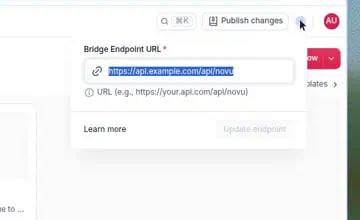
The glowing orb in the Dashboard header shows the bridge URL for the selected environment.
Using vercel preview url
In free tier, vercel preview urls for non production deployments are not publicly accessible. You will need to enable Protection Bypass for Automation from settings to make the preview url publicly accessible. Use vercel generated secret key in query params with bridge url to make the bridge url accessible to novu. Example:https://my-app-preview-url.vercel.app/api/novu?x-vercel-protection-bypass=BYPASS_SECRET_KEY
Sync failed while calling the bridge
novu sync always returns 400. The body is only a message. It does not include the code a step failure includes.
A URL rejected before sync connects looks like bridgeUrl: Invalid URL format. or bridgeUrl: Requests to private or reserved IP addresses are not allowed (resolved: <ip>). A URL rejected while sync is calling the bridge keeps this message, with no reason code: