

HTTP endpoint (/api/novu or similar) to be exposed by your application. This endpoint is used to receive events from our Worker Engine.
A bridge endpoint is only required for workflows built with Novu Framework (code-first workflows). Workflows built in the Dashboard run on Novu’s shared bridge endpoint, which Novu manages internally. You don’t need to expose, configure, or know the URL of the shared endpoint.
npx novu init command creates a Bridge application for you with a Bridge Endpoint ready to go.
View your bridge URL
After you sync a bridge URL to an environment, Novu shows it in the Dashboard header.- Open the Novu Dashboard and select the environment you synced (Development or Production).
- In the top-right navigation bar, look for the glowing status orb next to Publish changes.
- Click the orb to open the Bridge Endpoint URL popover. You can view the current URL there, or update it and click Update endpoint.
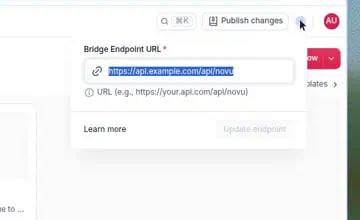
Click the glowing orb in the top-right navigation bar to view or update your Bridge Endpoint URL.
The serve function
We offer framework specific wrappers in form of an exported serve function that abstracts away:
- Parsing the incoming request for
GET,POST,PUTandOPTIONSrequests - HMAC header authentication
- Framework specific response and error handling
serve functions for the following frameworks:
Retry behavior
When Novu calls your bridge endpoint to execute a framework step, transient failures are retried automatically before the step is marked as failed. Novu retries up to 3 times with exponential backoff (2^attemptCount × 500ms):
Retries are triggered for these HTTP status codes:
408, 429, 500, 503, 504, 521, 522, and 524.
Retries are also triggered for transient network error codes such as EAI_AGAIN, ECONNREFUSED, ECONNRESET, ETIMEDOUT, and ENOTFOUND.
Other responses - for example most 4xx errors outside 408 and 429 - are not retried. Each bridge request has a 5 second timeout.
Bridge request errors
A preview or a step returnscode and message when a call to your bridge fails. novu sync returns 400 and the message only. Bridge request errors quotes each message and says what to run, including the novu-signature check behind SignatureMismatchError.
Writing a custom serve function
If we currently don’t support your framework, you can write a custom serve function like the following example:
What is the difference between tunnel url and bridge url?
What is the difference between tunnel url and bridge url?
The tunnel url is the url that is generated when you run the
npx novu@latest dev command. It is used to test your notifications by triggering them from the Dashboard’s Local environment. For local development and testing, you can use the tunnel url as bridge url. For production, you should use deployed application url with bridge endpoint as the bridge url.How can I see my deployed bridge URL?
How can I see my deployed bridge URL?
When a bridge URL is set for an environment, open the Novu Dashboard and click the glowing status orb in the top-right navigation bar. The popover shows the current Bridge Endpoint URL. See View your bridge URL.
Is it necessary to have bridge url publicly accessible?
Is it necessary to have bridge url publicly accessible?
Yes, the bridge url must be publicly accessible. We recommend having https enabled for the bridge url. A failed call returns
message and code. See Bridge request errors for the message, the debug checks, and the fix for each code.Can endpoint other than /api/novu be used?
Can endpoint other than /api/novu be used?
Yes, you can use any path you want. However, you need to make sure that the endpoint is used in the bridge url. Bridge url is made of the base url and the endpoint path. If your path is /custom-path/novu and deployed application url is https://my-app.com, then the bridge url will be https://my-app.com/custom-path/novu.
What happens when a bridge step request fails?
What happens when a bridge step request fails?
Novu retries transient errors up to 3 times with exponential backoff before marking the step as failed. See Retry behavior for retried status codes, network errors, and delay timings.