

Overview
When specific events happen in Clerk (for example, user signup, password changes, or email verification), this integration will:- Receive the webhook event from Clerk.
- Verify the webhook signature.
- Process the event data.
- Trigger the corresponding Novu notification workflow.
You can also clone this repository: https://github.com/novuhq/clerk-to-novu-webhooks
Prerequisites
Before proceeding, ensure you have:- A Clerk + Next.js app (Set up Clerk).
- A Novu account (Sign up here).
1
2
3
Expose Your Local Server
To test webhooks locally, you need to expose your local server to the internet.There are two common options:- localtunnel
- ngrok
localtunnel is a simple and free way to expose your local server without requiring an account.
-
Start a localtunnel listener
-
Copy and save the generated public URL (for example,
https://your-localtunnel-url.loca.lt).
localtunnel links may expire quickly and sometimes face reliability issues.
4
Set Up Clerk Webhook Endpoint
- Go to the Clerk Webhooks page (link).
- Click Add Endpoint.
-
Set the Endpoint URL as:
-
Subscribe to the relevant Clerk events (for example,
user.created,email.created).
You can find the list of all supported Clerk events here, or continue to Identify the Triggering Event(s).
- Click Create and keep the settings page open.
5
Add Signing Secret to Environment Variables
- Copy the Signing Secret from Clerk’s Webhook Endpoint Settings.
- Add it to your
.env.localfile:
6
Make the webhook route public
Incoming Clerk webhooks are not signed-in sessions. If you protect routes with Clerk middleware, exclude the webhook path:clerkMiddleware() does not protect any routes. This step only matters if you have already added auth checks that would block /api/webhooks.7
Create Webhook Endpoint for Clerk in Next.js
Createapp/api/webhooks/clerk/route.ts:app
api
How the handler works
How the handler works
verifyWebhook: Clerk’s helper validates the Svix signature usingCLERK_WEBHOOK_SIGNING_SECRET. Pass theRequestdirectly so the raw body is preserved. Do not callrequest.json()before verification.EVENT_TO_WORKFLOW_MAPPINGS: Maps Clerk event types to Novu workflow identifiers. Foremail.created, the nested map uses the emailslug(for example,password_changed).subscriberBuilder: Builds the Novutoobject. Preferuser_idwhen present (session and email events); fall back toidforuser.created.triggerWorkflow: Calls your Novu helper with the workflow ID, subscriber, and event payload.
8
Add Novu Workflow Notification Trigger Function
Createapp/utils/novu.ts :app
utils
api
9
Add or create Novu workflows in your Novu dashboard
In Novu, a Clerk webhook event can trigger one or more workflows, depending on how you want to handle those events.A workflow defines a sequence of actions (for example, sending notifications) that run when triggered by a webhook.The Novu dashboard lets you create a custom workflow from scratch or start from a template.Steps to Create a WorkflowFollow these steps to set up your workflow(s) in the Novu dashboard:Identify the Triggering Event(s)
Determine which Clerk webhook events will activate your workflow (for example,user.created or email.created).
Create Novu workflow identifiers that match the values in EVENT_TO_WORKFLOW_MAPPINGS.Supported webhook events
Supported webhook events
To find a list of all the events Clerk supports:
- In the Clerk Dashboard, navigate to the Webhooks page.
- Select the Event Catalog tab.
Payload structure
Payload structure
Clerk events are JSON objects with
type, data, timestamp, and instance_id. For user.* events, data is a User object. Your handler maps data.id (or data.user_id when present) to Novu’s subscriberId.Shortened user.created example:Choose Your Starting Point
- Use a Workflow Template
- Create a Blank Workflow
- Code-First Workflow (Novu Framework)
Browse the workflow template store in the Novu dashboard. If a template matches your use case (for example, user onboarding), select it and customize it.
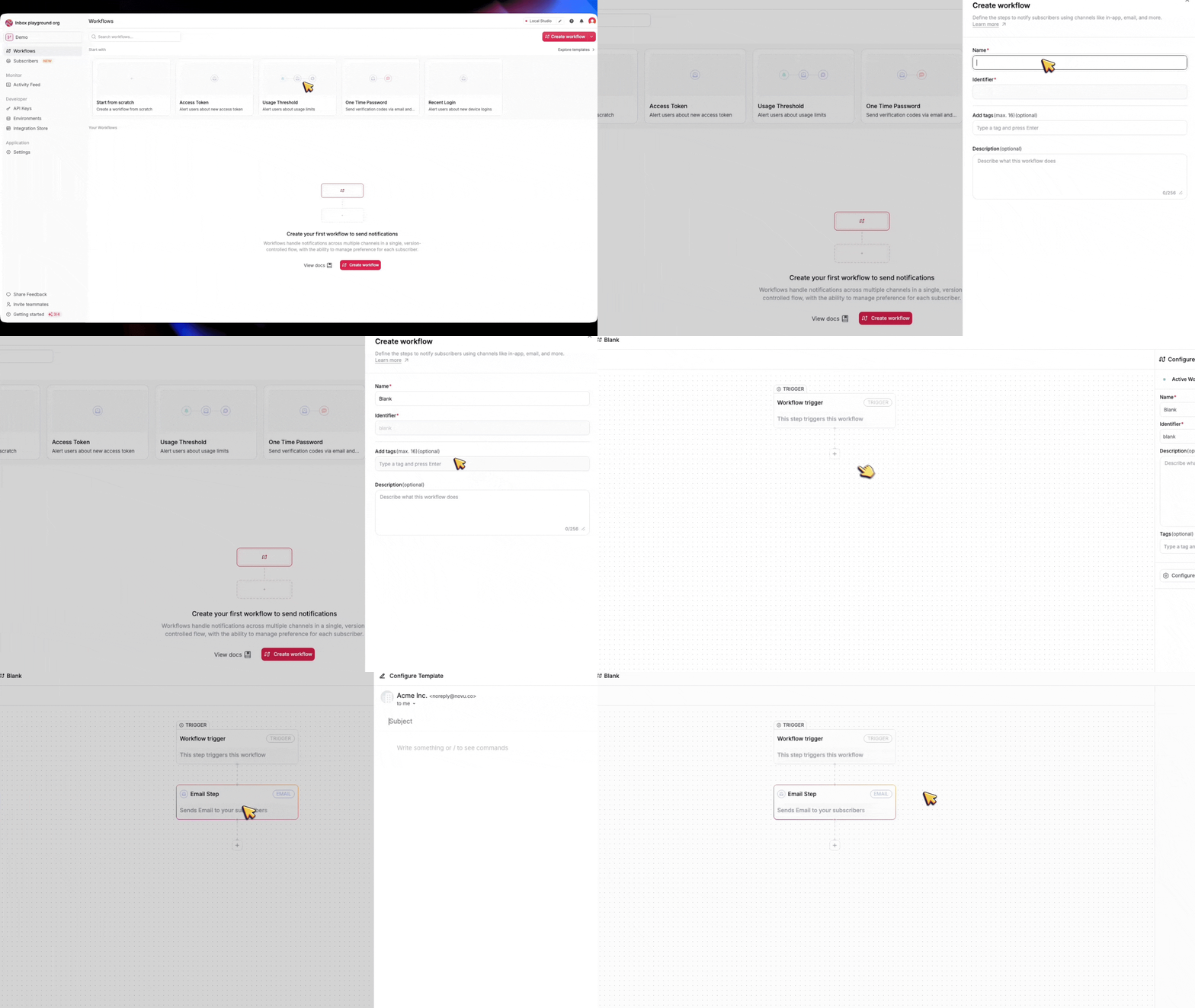
Configure the Workflow
- For a template, tweak the existing steps to align with your requirements.
- For a blank workflow, add actions like sending emails, sending in-app notifications, Push notifications, or other actions.
- For a code-first workflow, you can use the Novu Framework to build your workflow right within your code base.
Set Trigger Conditions
- Link the workflow to the correct webhook event(s).
-
Ensure the Novu workflow identifier matches the value in
EVENT_TO_WORKFLOW_MAPPINGSfor that Clerk event.
10
Disable Email Delivered by Clerk
By default, Clerk sends email notifications whenever necessary, such as Magic Links for email verification, Invitations, Password Resets, and more.To prevent users from receiving duplicate emails, we need to disable email delivery by Clerk for the notifications handled by Novu.-
Navigate to the Emails section in the Clerk Dashboard.
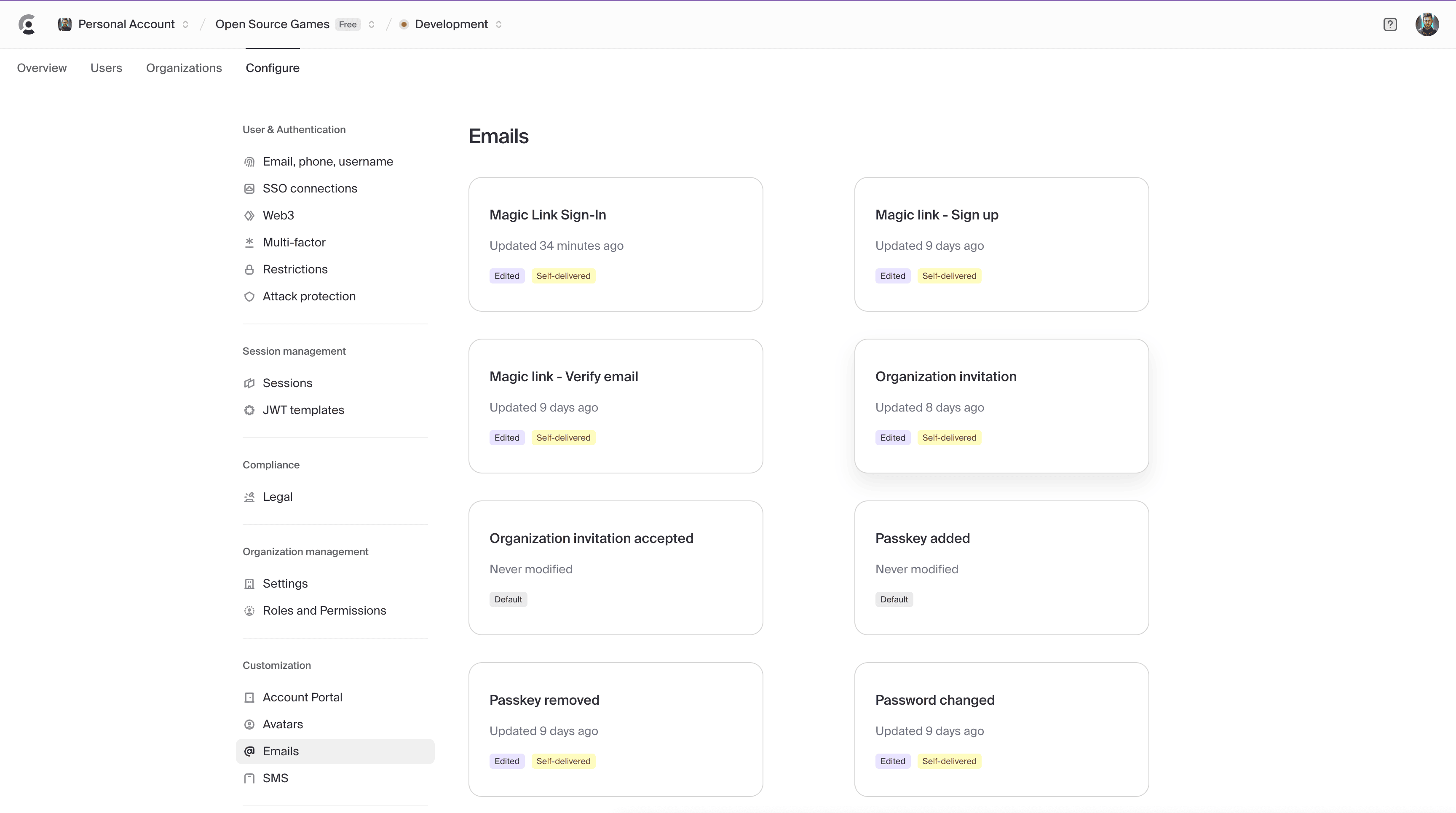
- Select any email.created event that you want Novu to handle.
-
Toggle off email delivery for the selected event.
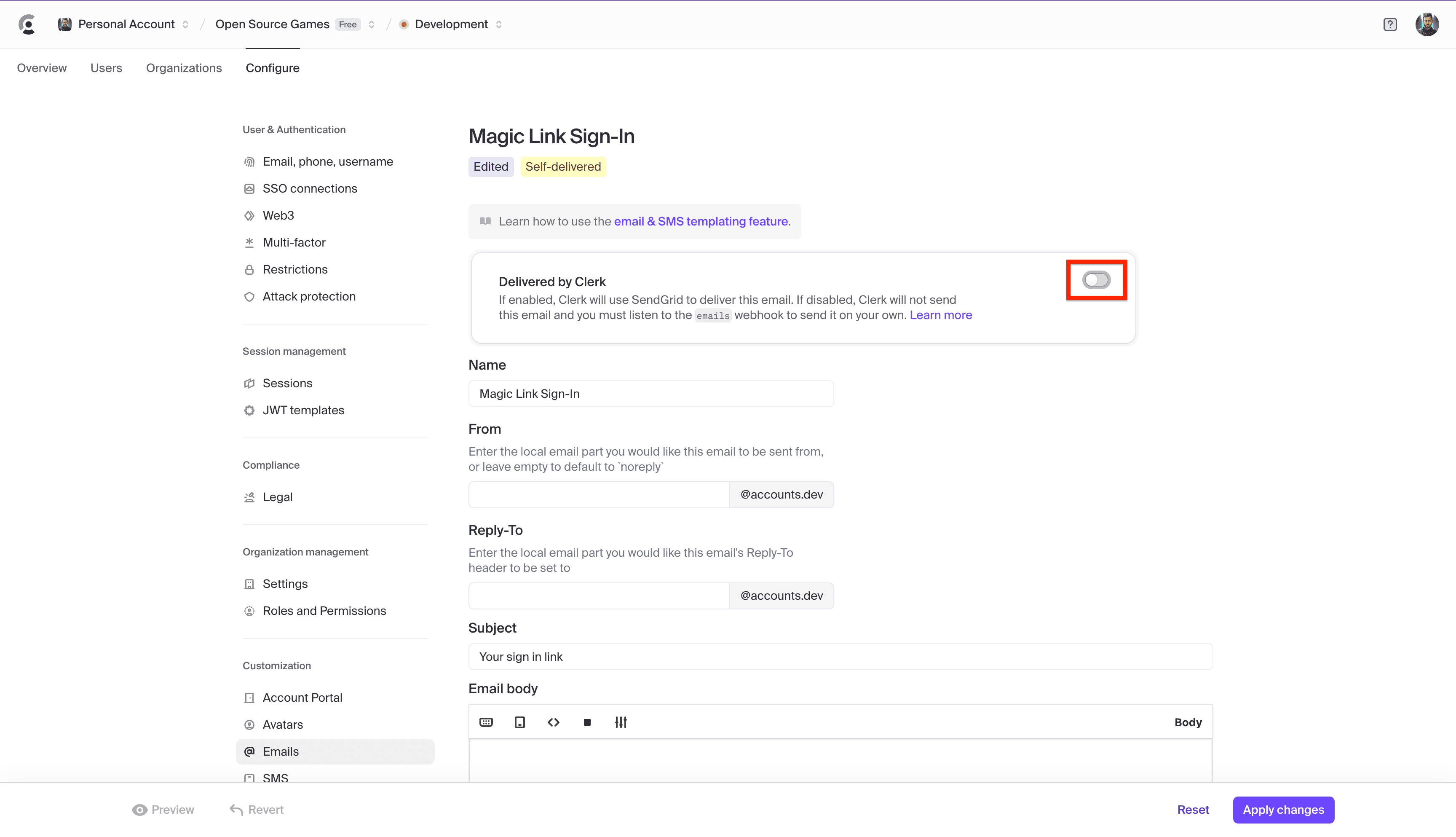
11
Test the Webhook
- Start your Next.js server.
- Go to Clerk Webhooks → Testing.
- Select an event (for example,
user.createdoremail.created). - Click Send Example.
- Verify logs in your terminal.