

Inbound flow
Users can message your agent, and your agent can message back. When someone interacts on a connected platform, Novu resolves identity and conversation state, forwards a context object to your server, then delivers your reply to the right thread.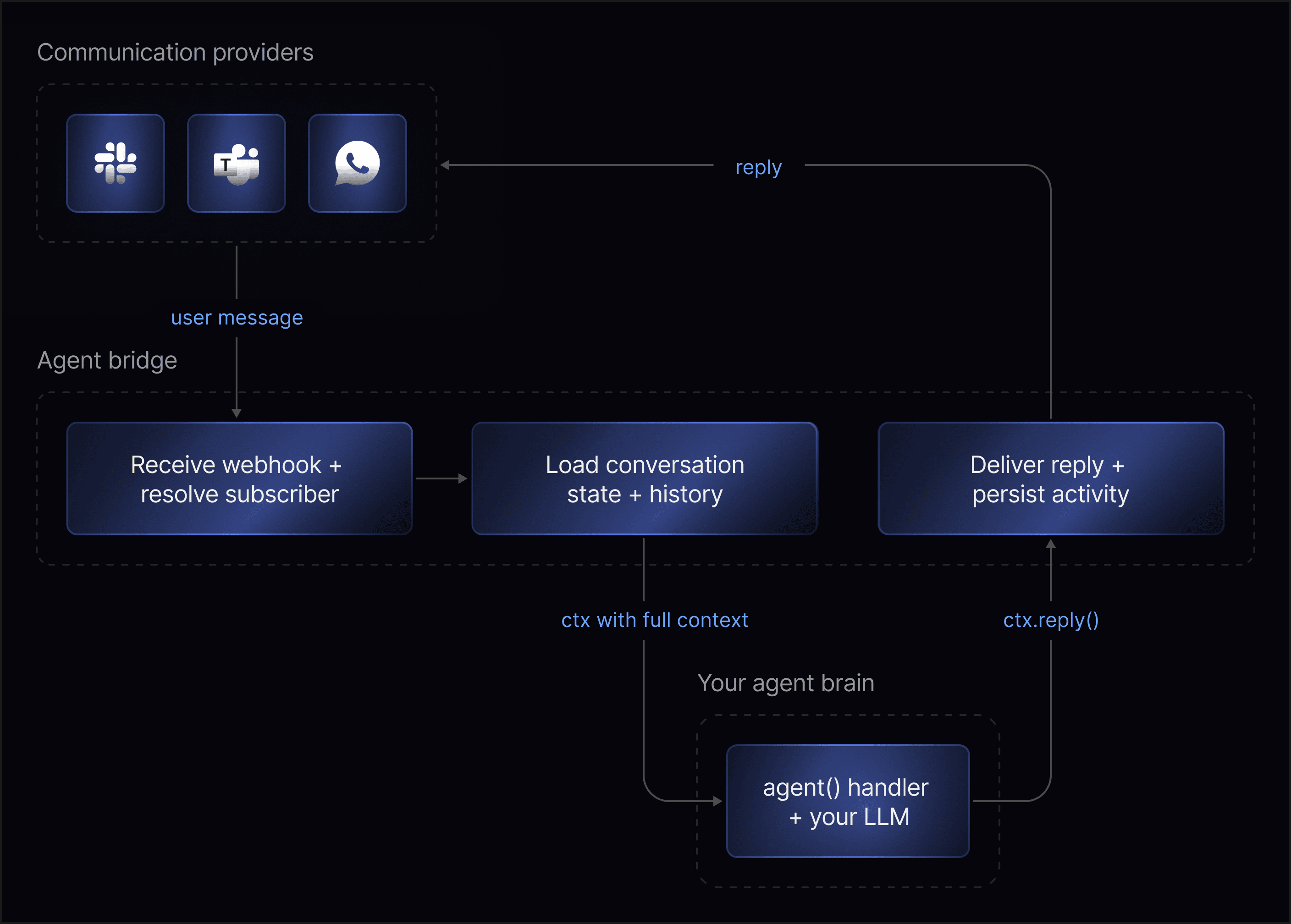
Your server never calls Slack, Teams, or email APIs directly. It gets a context object and returns a reply; Novu handles the rest.
Key entities
Agent
The dashboard object that connects your code to one or more chat providers. Each agent has a name, identifier, and event handlers. It does not define your model, prompts, tools, or business rules. It is the bridge to the app where that logic lives. The provider is where the user chats; the agent is how your app responds.Provider connection
Credentials and config that link an agent to a platform (Slack, Teams, WhatsApp, email, and others). Setup and capabilities differ per provider (reactions, typing indicators, attachments, cards, message edits, and so on). Novu normalizes inbound events before your handler runs, so you work with one interface instead of provider-specific webhooks. Your handler code stays provider-agnostic; Novu translates outbound replies per platform.Conversation
The stateful thread for a chat. Novu creates or loads it when a message arrives. It holds history, metadata, participants, status, and platform context. The agent is a participant, not the conversation itself (relevant when you read threads in the dashboard). A Slack thread, email thread, or similar maps to one Novu conversation. Lifecycle: Active from the first message until resolved. Resolved when the agent emits the resolve signal (onResolve runs; optional summary stored). Reopened automatically if the user messages again after resolution.
Participants and identity
Novu maps platform users to subscribers when it can:- Match found: handler gets subscriber ID, name, email, and related fields.
- No match: user is tracked as a platform user; write handlers that tolerate missing subscriber data.
Bridge surface
The same handler API applies no matter which provider sent the event or which model you use. Your app exposes a bridge endpoint where Novu calls your handlers - see Connecting your app for project structure,serve(), and environment variables.
Event handlers
Handlers connect Novu’s delivery layer to your app. An
onMessage handler might pass context to an LLM and return a reply through Novu.
Context object
Each handler receives a context with some or all of:- Incoming message
- Conversation state and metadata
- Resolved subscriber (when available)
- Recent history
- Provider and platform details (thread, channel IDs)
- Methods to reply, set metadata, trigger workflows, or resolve
Replies vs signals
Replies are user-visible messages: plain text, markdown with files, or interactive cards (buttons, dropdowns, links, inputs). Card interactions fireonAction with actionId and value.
Signals update state without necessarily sending another chat message:
Replies talk to the user; signals update the system around the conversation. One handler turn can reply, set metadata, trigger a workflow, and resolve.
ctx.emit sends a named payload on the turn. It is not a reply and not a signal. Web Chat renders it as a data part.
Signals queue in memory and batch with your next ctx.reply() in one request. If the handler exits without calling ctx.reply(), pending signals still send.
Conversations and workflows
Conversations and Novu workflows share the same account:- Conversation to workflow: User asks in Slack for a report by email; handler calls
ctx.trigger()and an existing workflow sends the email. - Workflow to conversation: Assign an agent on the workflow so chat and email steps send as that agent. When the subscriber replies, Novu opens an agent conversation and hydrates
ctx.notificationwith the original payload. See Workflow-assigned agents.
Full flow (example: Slack)
1
User messages the agent
The user sends a message from a connected provider such as Slack.
2
Novu receives the event
The provider delivers the inbound message to your agent endpoint.
3
Novu maps the thread
Novu resolves the conversation and subscriber from the provider metadata.
4
Novu calls onMessage
Your agent handler receives the message context and generates a reply.
5
Handler passes context to agent logic
Your handler forwards the message and
ctx.history to your LLM or custom logic.6
Agent logic decides next action
Your agent logic decides what should happen next.
7
Handler sends reply or signals
Your handler returns a reply, calls
ctx.reply(), or emits signals.8
Novu posts the reply
The reply is sent to the provider thread the user is messaging from.
9
Novu records conversation state
Novu records messages, participants, metadata, signals, and status.
Next steps
Connect AI SDK
Connect an existing agent to Slack and get a reply in-thread.
AI SDK reference
Adapter API for
@novu/framework/ai-sdk.LangChain reference
Adapter API for
@novu/framework/langchain.Agents API reference
Create agents, link providers, and update bridge URLs programmatically.