

Send to rooms
Deliver plain text or Markdown notifications to a room or an existing message thread.
Send direct messages
Link a subscriber through OAuth or identify the recipient by Webex person ID or email.
Prerequisites
- A Webex developer account.
- Permission to create a Webex integration.
- A Novu environment and secret key.
- A Webex room ID for room notifications, or a Webex person ID or email for direct notifications.
Configure a Webex integration
Webex integrations use OAuth 2.0 to act on behalf of an authorized Webex user. The user who authorizes the connection must be able to access the rooms and people you want to target.Create the integration in Webex
1
Open My Webex Apps
Sign in to the Webex for Developers portal and open My Webex Apps.
2
Create a new integration
Select Create a New App, then choose Create an Integration.
3
Enter the application details
Add a user-facing name, icon, and description. Webex displays this information on the authorization screen.
4
Add the Novu redirect URI
Register the callback URI for the region where your Novu environment is hosted.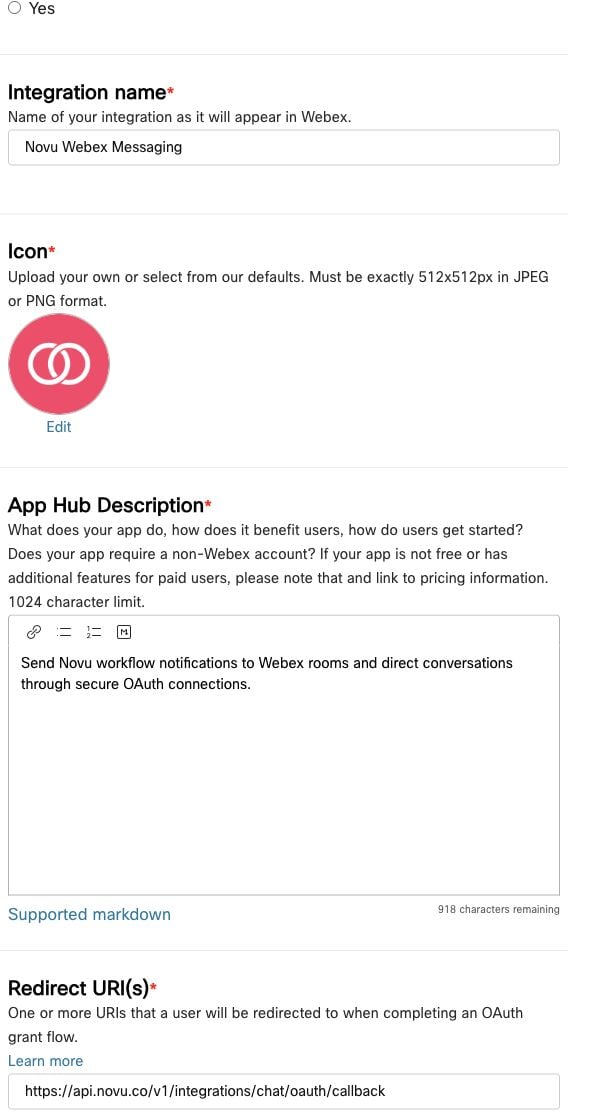
5
Select OAuth scopes
Select the following scopes: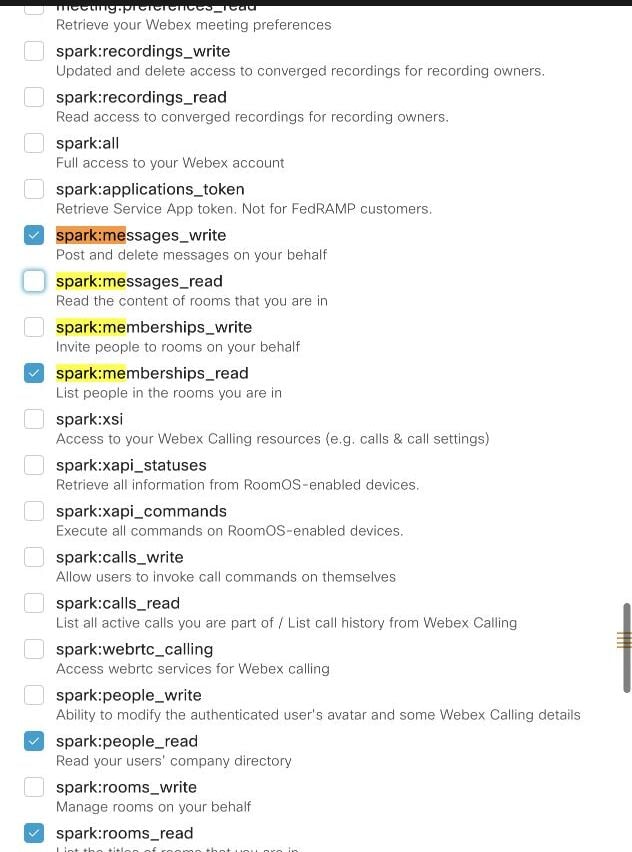
spark:messages_writespark:rooms_readspark:people_readspark:memberships_read
spark:kms to registered integrations. Novu includes it when generating the authorization URL because Webex requires it for encrypted message content.6
Create the integration
Save the integration, then copy its Client ID and Client Secret.
For more information, see Webex Integrations and Authorization.
Configure Webex Messaging in Novu
1
Open the Novu dashboard
Sign in to the Novu Dashboard.
2
Open the Integrations Store
In the sidebar, select Integrations Store, then click Connect provider.
3
Select Webex Messaging
Choose Webex Messaging from the Chat providers.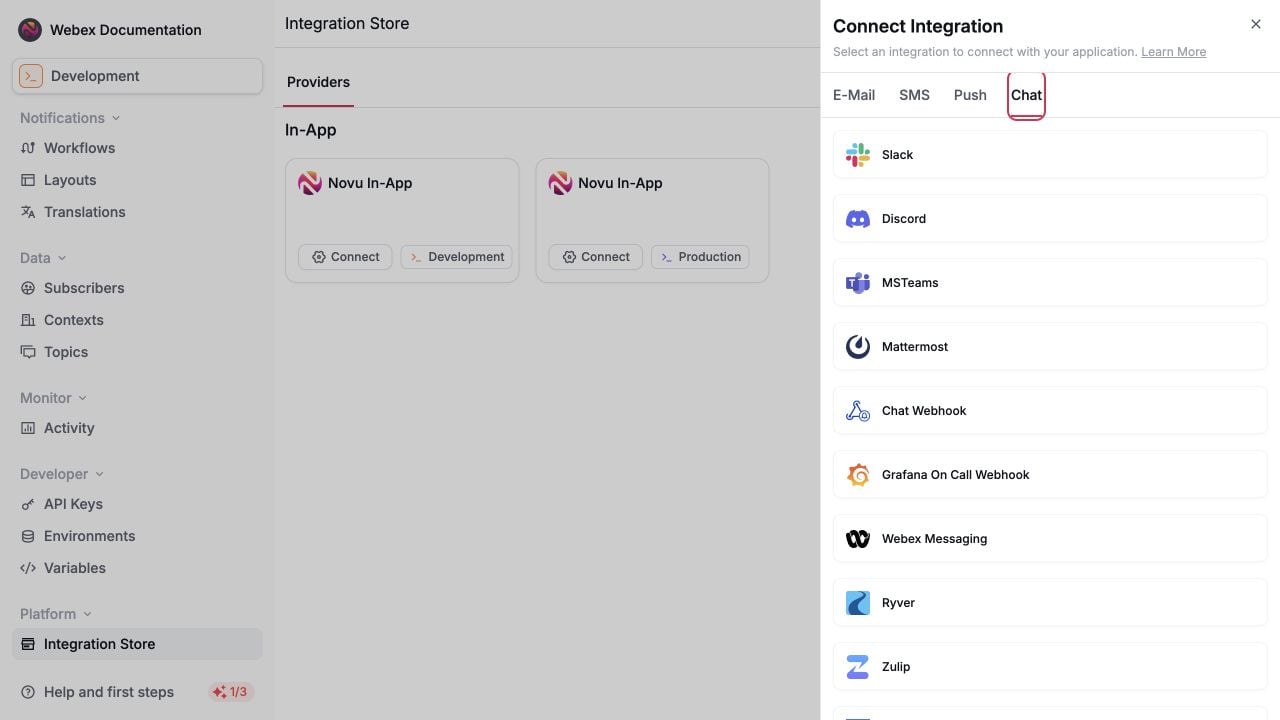
4
Enter the credentials
Add the values from your Webex integration:
- Client ID: The Webex integration client ID.
- Client Secret: The Webex integration client secret.
- Redirect URL (optional): Where Novu sends the browser after OAuth succeeds. If omitted, Novu displays a success page.
-
Base URL (optional): Leave empty to use
https://webexapis.com/v1.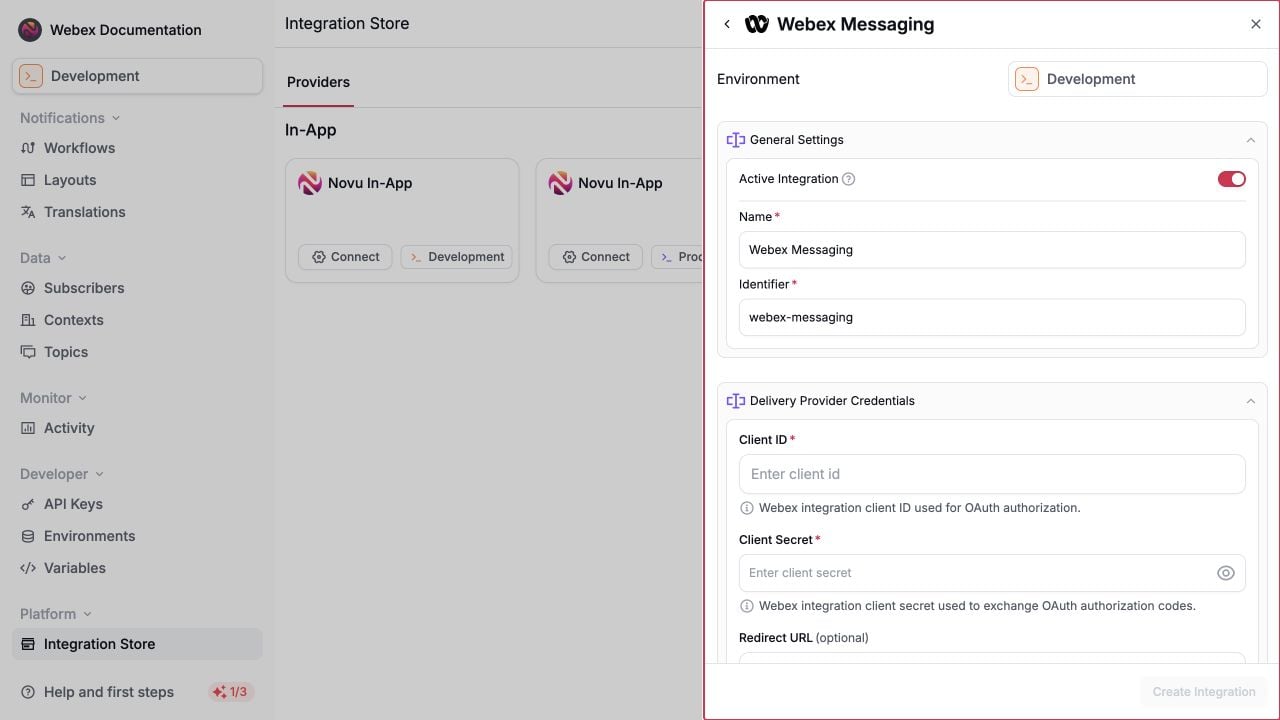
5
Create the Novu integration
Save the integration. The examples below use
webex-messaging as its integration identifier. Replace it if you chose a different identifier.The optional Redirect URL in Novu is different from the Webex redirect URI. Webex must redirect to Novu’s regional OAuth callback. The Novu field controls where the user goes after Novu finishes the callback.
Connect a Webex organization
Create a channel connection before registering room or person endpoints. Providing your ownconnectionIdentifier makes it easy to reference the connection later.
The following example creates a shared connection for the acme context. Call it from your backend when an administrator or authorized user clicks Connect Webex in your application.
- Node.js
- Python
- Go
- PHP
- .NET
- Java
- cURL
Connect and link the current person in one flow
For a subscriber-scoped connection, setautoLinkUser to true. Novu creates the connection and a webex_person endpoint for the Webex person who completes OAuth.
Link a subscriber to an existing connection
Use a separate link-user flow when the Webex organization is already connected and another subscriber needs a personal endpoint.- Node.js
- Python
- Go
- PHP
- .NET
- Java
- cURL
people/me and creates a webex_person endpoint linked to the existing connection.
Choose delivery destinations
Every Webex endpoint must reference a Webex Messaging connection throughconnectionIdentifier. If the connection has a Novu context, the endpoint must use the same context.
Send to a Webex room
Use the Webex Rooms API or a room picker in your application to obtain the room ID. The authorizing Webex user must be a member of the room. Create awebex_room endpoint for the subscriber and context that should receive messages:
- Node.js
- Python
- Go
- PHP
- .NET
- Java
- cURL
Send to a Webex person
The recommended approach is to useautoLinkUser or the link-user OAuth flow. These flows identify the person who signs in and create the endpoint automatically.
You can also create a webex_person endpoint manually. Provide exactly one of personId or personEmail.
- Node.js
- Python
- Go
- PHP
- .NET
- Java
- cURL
Send notifications
Create a workflow with a Chat step and select the Webex Messaging integration. After the matching connection and endpoint exist, trigger the workflow with the same subscriber and context.- Node.js
- Python
- Go
- PHP
- .NET
- Java
- cURL
Format Webex messages
The dashboard Chat step sends its body as Webextext. Use trigger overrides when you need Webex-specific message fields such as markdown, files, or attachments.
The example below adds Webex Markdown to a specific Chat step:
webex-chat-step with the Chat step identifier from your workflow.
For supported Webex payload fields, see Create a Message.
Troubleshooting
Related
Webex Messages API
Review Webex message destinations, content fields, and API behavior.