

How subscription fits into the notification flow
The Subscription introduces a filtering layer between the trigger and the subscriber. When you trigger a notification to a topic key, the system doesn’t automatically send it to everyone. Instead, it follows this evaluation flow:- Trigger: You trigger a workflow to a
topicKeyand include a data payload and optional Context. - Match: Novu retrieves topic subscriptions whose Context matches the trigger (exact match), then resolves the subscribers.
- Evaluate: The system checks each matching subscription’s conditions against the trigger payload (and workflow preferences).
- Deliver: Only subscribers whose subscriptions pass receive the notification.
Workflow and global settings control delivery and take precedence. If a subscriber has disabled email notifications globally, then they won’t receive email notifications for a subscription, even if the subscription condition is met.Subscribers filtered out by subscription Context or JSON Logic conditions do not create a workflow run and are not counted toward usage. See Billing and workflow runs.
Core concepts
To implement Subscriptions effectively, you should understand these components:- Topic: A topic groups notifications of a similar type. Refer to the Topics documentation for details on how to create and manage them.
- Subscribers: A subscriber represents the user or entity that receives notifications. Subscribers can join or leave topics and define preferences that control delivery. Refer to the Subscribers documentation for details on how to create and manage subscribers.
Subscription rules
Each subscription can include one or more conditions. Conditions determine whether an event should trigger a notification for that subscriber. You can define available conditions in your UI, and subscribers choose which ones apply to them.Multiple subscriptions per topic
Novu supports a 1-to-N relationship for subscriptions. This means, one subscriber can have multiple subscriptions to the same topic with different conditions. Novu evaluates each subscription independently. For example, in a trading app, a subscriber can have three separate alerts set up for the sameprice-alerts topic:
- Notify me when BTC is above $80k.
- Notify me when BTC is below $40k.
- Notify me when ETH is above $4k.
Subscription components
Novu provides a set of pre-built React components that you can use together or independently to build subscription experiences.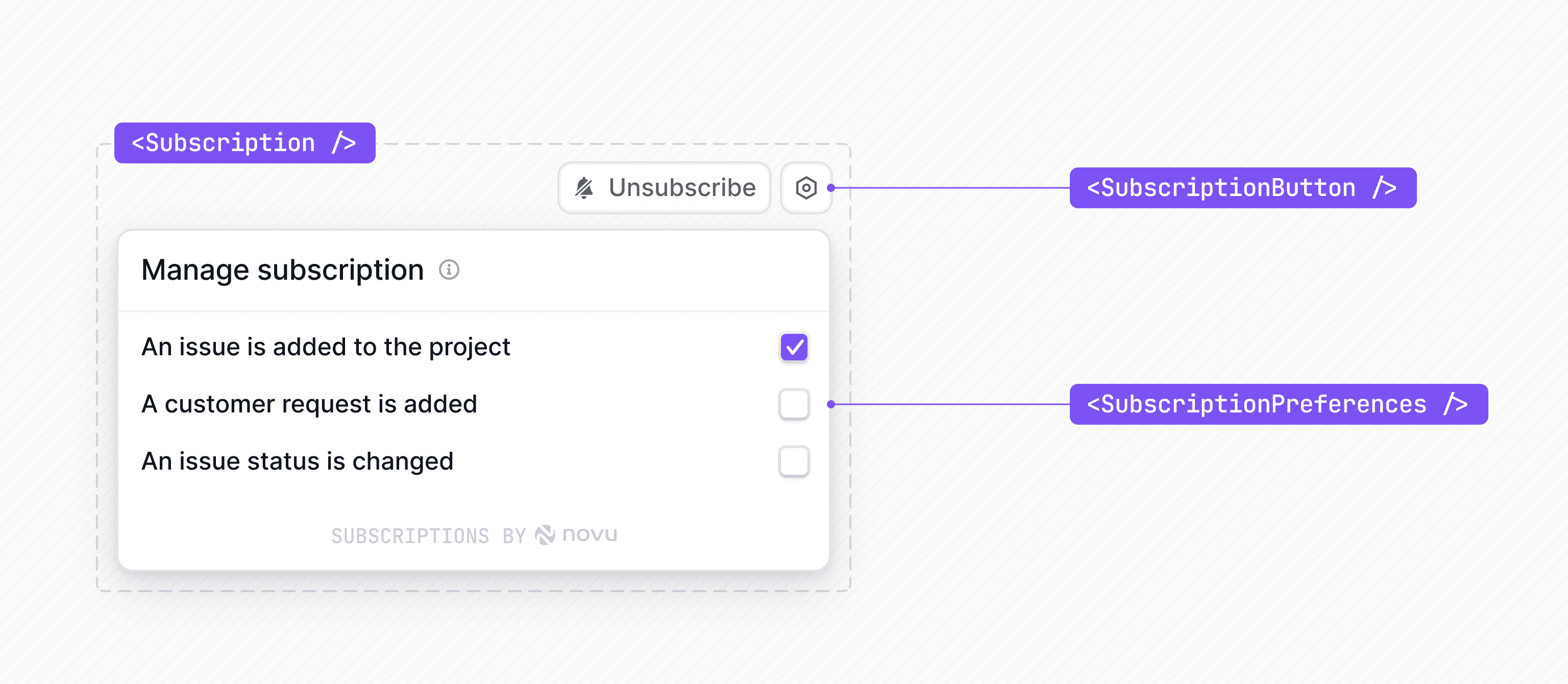
<Subscription />
The <Subscription /> component serves as the root provider and the default UI.
It requires the topicKey prop and optionally an identifier prop, and you must wrap it with the Novu provider as the source of session context.
<SubscriptionButton />
The <SubscriptionButton /> component renders only the subscribe or unsubscribe action. This is useful when you want to place a subscription control inline.
Use this component within the <Subscription /> component.
<SubscriptionPreferences />
The <SubscriptionPreferences /> component renders the list of preferences associated with a subscription. Preferences typically map to workflows or workflow groups within a topic.
Use this component when you want to control where and how preferences appear in your UI. Use it within a <Subscription /> context.
How Subscriptions relate to the Inbox
If you use the<Inbox />, then subscriptions determine which notifications appear in a subscriber’s feed. When a subscriber joins a topic, the <Inbox /> shows notifications from that topic according to the subscriber’s selected conditions. If the subscriber mutes the topic or sets rules that don’t match an event, then the Inbox doesn’t show those messages to that subscriber.
Subscriptions work with or without the <Inbox />, and have a standalone <Subscription /> component.
Manage topic subscriptions
To create subscriptions from your backend, from the browser with@novu/js, or in React with hooks and components (including payload-based JSON Logic conditions), see Manage topic subscriptions.