

To learn when to use the Digest step in a workflow, refer to the Digest step overview.
Group events by
By default, Digest groups events bysubscriberId, ensuring that each subscriber receives their own digest.
You can optionally add one additional aggregation key to further group events within a subscriber’s digest. This gives you finer control over how events are batched.
The aggregation key must come from the event payload defined in your payload schema. For example, if multiple users like different posts, you may want each subscriber to receive separate digests per post by grouping on payload.postId.
Digest window
The Digest window defines how long events are collected before the workflow continues. You can configure the digest window as Regular or Scheduled.Regular digest
This allows you to set the amount of time to digest events for. Once the defined time has elapsed, the digested events are sent.Control digest duration
You can configure the digest duration from the Digest events for field:- Seconds
- Minutes
- Hours
- Days
- Weeks
- Months
Maximum digest duration varies based on your plan. For more information, refer to the limits documentation.
Control when to start digest
You can also control when digesting begins by selecting any of the following options from the Start digest field:- Immediately: Start collecting events as soon as the first event arrives.
-
When events repeat: Check whether a similar notification was sent recently.
- If yes, start a digest.
- If not, deliver the notification immediately and skip digesting.
- When events repeat within 5 minutes.
- When events repeat within 30 minutes.
- Custom.
Scheduled digest
A scheduled digest collects events and delivers them at fixed calendar intervals instead of relative durations. You can schedule delivery:- Every minute
- Every hour
- Daily
- Weekly
- Monthly
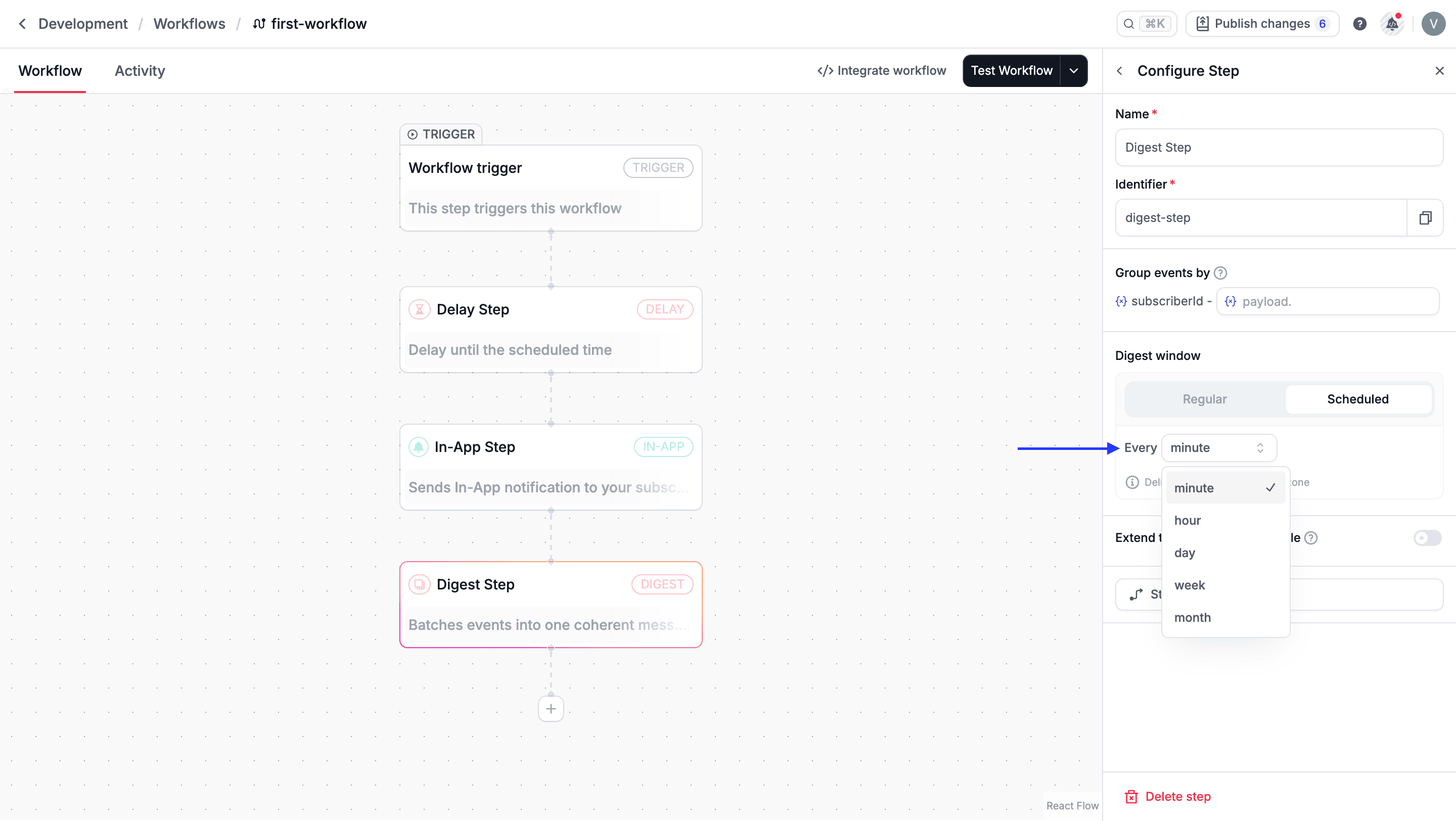
Scheduled digests are delivered in the subscriber’s time zone.
Extend to subscriber’s schedule
Extend to subscriber’s schedule is off by default. Turn it on when the digest should wait for the subscriber’s delivery schedule instead of sending as soon as the digest window ends. The schedule is weekly hours from the Inbox. It has no holiday calendar. Days the subscriber turns off are skipped. Days they leave on are delivery days, including public holidays.- The digest window ends inside an open window. Novu sends immediately.
- The window ends outside the schedule, and the toggle is on. Novu holds the digest until the start of the next enabled window, then sends.
- The window ends outside the schedule, and the toggle is off. Email, SMS, push, and chat steps after the digest are skipped. In-app steps, and every step in a critical workflow, are still delivered.
Example
Schedule: Monday–Friday, 9:00 AM–5:00 PM. Digest window: 1 hour. Toggle: on. The window ends Friday at 5:30 PM. Novu holds the digest until Monday at 9:00 AM, then sends the summary. With the toggle off, the Friday 5:30 PM email, SMS, push, or chat step is skipped. A Monday-only window of 9:00 AM–10:00 AM works the same way. If the digest ends Monday at 10:01 AM and the toggle is on, Novu sends the following Monday at 9:00 AM.How long Novu waits
Novu waits once, until the start of the next enabled window. It does not step through each closed day. A digest that ends Friday at 5:30 PM resumes Monday at 9:00 AM. A digest that ends Monday at 10:01 AM, when the only window is Monday 9:00 AM–10:00 AM, resumes the following Monday at 9:00 AM. The digest window you configure follows your plan limit: 1 day on Free, 7 days on Pro, and 30 days on Team. Enterprise limits are custom. The wait until the next window is separate from that duration, on every plan. If the subscriber changes the schedule while the digest is waiting, the chosen time stays in place. Novu reads the new schedule when that time arrives. A moment that is still inside the schedule sends then, including when the subscriber added an earlier window. A moment that is now outside the schedule waits until the next open slot. That wait, including the first one, happens at most 3 times. If the digest wakes after the third wait and the time is still outside the schedule, it ends. Email, SMS, push, and chat steps that follow are skipped. In-app steps are still delivered. Turning the schedule off does not send immediately. The digest wakes at the time already chosen and then sends, because the schedule is off. The same rules are documented on the Delay step.FAQs
If scheduled digest is set for 9:00 AM daily then will the digest be sent at 9:00 AM every day without any event triggered?
If scheduled digest is set for 9:00 AM daily then will the digest be sent at 9:00 AM every day without any event triggered?
Yes, if scheduled digest is set for 9:00 AM daily then the digest will be sent at 9:00 AM every day without any event triggered.
What is the difference between Regular and Scheduled Digest set to 1 Hour?
What is the difference between Regular and Scheduled Digest set to 1 Hour?
Both digests are the same in this case.
If digest step fails, will the workflow continue to the next step?
If digest step fails, will the workflow continue to the next step?
No, workflow execution will stop immediately if the digest step fails due to an error.